If you’ve ever stared at a blank canvas wondering how to turn your idea into an eye-catching image—without spending hours in design software or hiring someone—you’re not alone. Many content creators, small business owners, and freelancers hit this wall daily. That’s where Banana Pro comes in.
- How Banana Pro AI Works: A Simple 4-Step Workflow
- Step 1: Describe or Upload
- Step 2: Let AI Process
- Step 3: Style & Refine
- Step 4: Download & Use
- Vague Prompts Lead to Generic Outputs
- Ignoring Batch Generation
- Overlooking Commercial Rights Clarity
- Why Banana Pro AI Is a Game-Changer for Budget-Conscious Creators
- Real-World Use Cases Where Banana Pro AI Shines
- Final Thoughts: Creativity Without the Overhead
Unlike many AI tools that bury key features behind paywalls or demand technical fluency, Banana Pro AI offers a genuinely free, beginner-friendly path to generating high-quality visuals. Whether you’re crafting social posts, blog graphics, or product mockups, this tool removes friction without sacrificing output quality. In this guide, I’ll walk you through how to use Banana Pro AI effectively, spotlight common early mistakes, and share practical tips to get professional results fast—even if you’ve never touched an AI generator before.
How Banana Pro AI Works: A Simple 4-Step Workflow
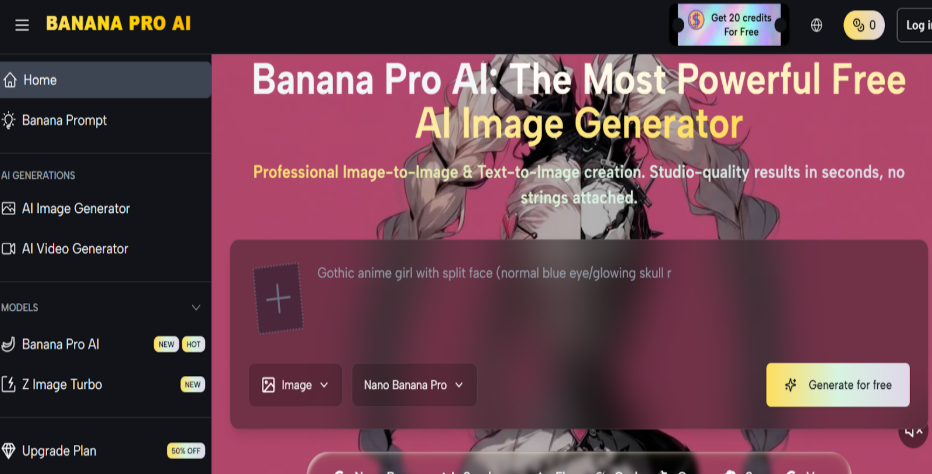
At its core, Banana Pro AI operates on two intuitive modes: Text to Image and Image to Image. You don’t need prior design experience—just a clear idea (or an existing photo) and a few minutes.
Step 1: Describe or Upload
Start by either typing a prompt (“a cozy coffee shop interior with warm lighting and wooden tables”) or uploading a reference image. The Banana Pro AI Image Generator handles both inputs smoothly. During my first try, I uploaded a basic product photo and asked for a “minimalist lifestyle shot”—the result surprised me with how well it interpreted context.
Step 2: Let AI Process
Behind the scenes, Banana Pro AI analyzes your input using trained models. For text prompts, it decodes semantics and style cues; for images, it preserves structure while applying transformations. Processing takes just 5–12 seconds—no waiting around.
Step 3: Style & Refine
This is where creativity meets control. Banana Pro offers presets like anime, watercolor, cinematic, or photorealistic styles. You can adjust intensity, combine aesthetics, or generate multiple variations instantly. Don’t settle for the first output—use batch generation to explore options.
Step 4: Download & Use
Every image comes in high resolution (up to 2048×2048) with full commercial rights. Save directly to your device or leverage the built-in Smart Asset Library to organize past creations by prompt or project.
Common Mistakes Beginners Make (And How to Avoid Them)



Even simple tools can trip you up if you skip foundational steps. Here are three frequent pitfalls I’ve seen—and experienced firsthand—with early Banana Pro AI usage:
Vague Prompts Lead to Generic Outputs
Saying “a dog” won’t cut it. The Banana Pro AI Image Generator thrives on specificity: breed, setting, lighting, mood. Instead of “a cat,” try “a fluffy ginger tabby sleeping on a sunlit windowsill, soft bokeh background.” The more vivid your description, the closer the result matches your vision.
💡 Tip: Use the AI Chat Assistant to refine your prompt. It suggests improvements conversationally—like a creative partner nudging you toward clarity.
Ignoring Batch Generation
Many users generate one image, dislike it slightly, and give up. But Banana Pro AI creates multiple variations per request. If your first result has odd proportions or off-color tones, scroll through alternatives—you might find a near-perfect version two clicks away.
Overlooking Commercial Rights Clarity
Some AI platforms restrict commercial use unless you upgrade. Not Banana Pro AI. Every image you make—even on the free tier—comes with full commercial rights. Still, it’s smart to double-check the current terms in-app, just as I do before using any asset for client work.
Why Banana Pro AI Is a Game-Changer for Budget-Conscious Creators
Time and money are tight for solopreneurs and small teams. Banana Pro AI directly addresses both constraints.
Zero Cost, Zero Compromise
Most “free” AI image tools limit resolution, add watermarks, or gate advanced styles. Banana Pro AI doesn’t. High-res downloads, commercial rights, batch generation, and style presets are all included—no credit card required. This levels the playing field for creators who can’t afford monthly subscriptions.
Speed = More Iterations, Better Results
Traditional design workflows involve mockups, revisions, and back-and-forth. With Banana Pro AI, you can test five visual directions in under a minute. Need a hero banner for a webinar? Generate three versions with different moods (energetic, calm, futuristic), pick the best, and move on. That agility accelerates entire campaigns.
No Learning Curve
You won’t drown in sliders, layers, or export settings. The interface is clean: type, upload, choose a style, download. As someone who’s wasted hours wrestling with complex editors, I appreciate how Banana Pro AI respects my time.
Real-World Use Cases Where Banana Pro AI Shines
You don’t need to be a digital artist to benefit. Here’s how everyday creators leverage Banana Pro AI:
- Social Media Managers: Generate on-brand post visuals without Canva templates. Try “Instagram carousel background in brand colors with abstract geometric shapes.”
- E-commerce Sellers: Create lifestyle product shots from plain photos using Image to Image. Turn a white-background mug into a “morning coffee scene on a rustic table.”
- Bloggers & Newsletter Writers: Produce custom illustrations that match article tone—e.g., “hand-drawn style infographic about remote work stats.”
- Freelance Marketers: Deliver client mockups faster. Pitch three ad concepts in minutes instead of days.
The Banana Pro AI Image Editor isn’t just for pretty pictures—it solves real workflow bottlenecks.
Maximizing Efficiency: Pro Tips for First-Time Users
Getting great results quickly comes down to smart habits. Here’s my shortlist:
- Start with presets: If you’re unsure about style names, browse the preset gallery first. Apply one, then tweak.
- Save successful prompts: The Smart Asset Library auto-saves your inputs. Reuse what works—no need to retype “vintage travel poster of Paris” every time.
- Combine Text + Image: Upload a rough sketch and describe enhancements. Banana Pro AI blends both inputs intelligently.
- Use natural language: You don’t need “AI prompt engineering” skills. Say what you mean: “Make this look like a movie still from a 90s thriller.”
I once needed a background for a podcast cover. Instead of hunting stock photos, I typed “moody blue gradient with subtle soundwave pattern, dark mode aesthetic” into Banana Pro AI. Got four usable options in 10 seconds. That’s the power of removing barriers.
Final Thoughts: Creativity Without the Overhead
Banana Pro AI won’t replace human artistry—but it eliminates the tedious parts that slow us down. For non-designers, it’s a bridge between imagination and execution. For busy professionals, it’s a force multiplier.
What stands out most isn’t just the tech—it’s the philosophy. By offering full features for free, Banana Pro AI trusts users to create freely. No upsells, no hidden limits, just a clean tool that delivers.
If you’ve hesitated to try AI image generation because of cost, complexity, or confusion, Banana Pro AI is the gentle on-ramp you’ve been looking for. Start small, experiment often, and remember: your first prompt doesn’t need to be perfect. With Banana Pro AI, iteration is instant—and that’s where the magic happens.