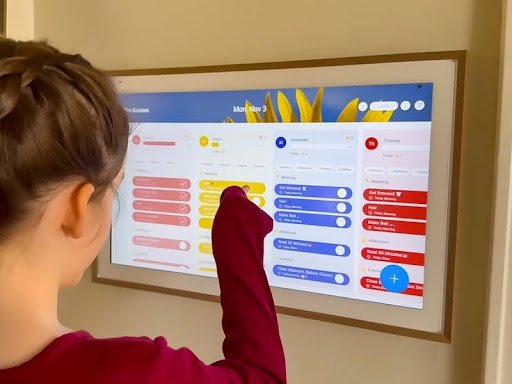
The demand for technology in education continues to accelerate as institutions seek smarter ways to improve training efficiency and learner outcomes. Yet educators consistently face persistent challenges: disjointed schedules that consume valuable preparation time, fragmented communication channels that hinder collaboration, and a lack of unified tools that bring training participants together in one accessible space. These obstacles reduce productivity and limit the impact of even the most well-designed programs.
- The Growing Need for Innovative Training Tools in Education
- Introducing Apolosign Digital Family Calendar: A Solution for Training Enhancement
- Real Use Cases: Apolosign in Action for Educational Success
- Case Study 1: Streamlining Classroom Schedules
- Case Study 2: Coordinating Large-Scale Training Workshops
- Case Study 3: Managing Global Student Projects
- Fostering Global Collaborations with Digital Tools
- Step-by-Step Guide to Implementing Apolosign in Training Programs
- Step 1: Assess Your Training Needs and Goals
- Step 2: Set Up and Customize Apolosign for Your Context
- Step 3: Integrate with Existing Educational Tools and Platforms
- Step 4: Train Users and Monitor Implementation
- Transform Your Training Programs with Purposeful Digital Integration
ApoloSign Digital Family Calendar offers an innovative solution purpose-built to address these pain points. Originally designed to keep families organized, its robust scheduling, collaboration, and communication features translate powerfully into educational and training environments. This article explores real use cases demonstrating how teachers and trainers worldwide have leveraged ApoloSign to streamline operations, enhance participant engagement, and foster global collaborations. Whether you coordinate classroom activities, run professional development workshops, or manage international student projects, the practical examples and implementation strategies ahead will show you exactly how this tool can transform your training programs.
The Growing Need for Innovative Training Tools in Education
The educational landscape has shifted dramatically in recent years. Traditional methods—paper-based schedules pinned to bulletin boards, email chains for coordination, and manual attendance tracking—simply cannot keep pace with the complexity of modern training programs. Educators are managing hybrid classrooms, multi-session workshops, and asynchronous learning modules simultaneously, often with tools that were never designed for such demands. This disconnect between evolving training needs and outdated organizational methods creates friction that directly impacts learner outcomes.
As a result, teachers and trainers are actively searching for real-world examples that validate technology integration before committing to new platforms. They want proof that a digital tool will save time, not add another layer of complexity. This is precisely where digital calendars designed for collaborative environments enter the picture—offering a familiar interface with powerful features that go far beyond marking dates.
Challenges Faced by Modern Educators
Time management remains the most cited frustration among educators. Coordinating schedules across multiple groups, aligning training sessions with resource availability, and keeping every participant informed consumes hours that could be spent on curriculum development or direct instruction. Group training compounds these difficulties; when ten or twenty participants need to synchronize around a shared timeline, even minor miscommunications cascade into missed sessions and disengagement. Additionally, many educators lack access to collaborative platforms that centralize scheduling, resource sharing, and communication in one place. They end up toggling between separate apps for messaging, calendar management, and file distribution—a fragmented workflow that drains productivity and introduces errors.
The Role of Technology in Addressing Training Gaps
Smart devices and cloud-based platforms are no longer optional supplements; they have become essential infrastructure for effective training delivery. The most impactful tools share two qualities: seamless integration with existing workflows and interfaces intuitive enough that participants adopt them without extensive onboarding. When a digital platform meets both criteria, it closes the gap between planning and execution, giving educators real-time visibility into schedules, participant engagement, and resource allocation. This foundation makes it possible to shift focus from administrative logistics back to what matters most—delivering high-quality training experiences.
Introducing Apolosign Digital Family Calendar: A Solution for Training Enhancement
ApoloSign Digital Family Calendar began as a household coordination tool, but its architecture—built around shared timelines, collaborative spaces, and intelligent notifications—makes it remarkably well-suited for educational training environments. At its core, ApoloSign provides a centralized hub where multiple users can view, edit, and respond to scheduled events in real time. For educators, this translates into a single platform where lesson plans, workshop agendas, participant rosters, and resource links coexist without the chaos of switching between disconnected applications.
What distinguishes ApoloSign from generic calendar apps is its intentional design around group dynamics. Standard calendars treat events as isolated entries; ApoloSign treats them as collaborative workflows. Each scheduled session can include attached materials, discussion threads, task assignments, and automated reminders tailored to different participant roles. This means a trainer preparing a multi-day workshop can build the entire experience—from pre-session readings to post-session feedback collection—within a single calendar framework. The result is training enhancement that feels organic rather than forced, because the tool adapts to how educators already think about program delivery.



Key Features That Boost Training Efficiency
Real-time updates ensure that every schedule change propagates instantly to all participants, eliminating the confusion of outdated information. Multi-user access allows trainers, co-facilitators, and learners to interact with the same calendar simultaneously, each seeing role-appropriate details. Customizable templates let educators build reusable frameworks for recurring training formats—weekly seminars, monthly professional development cycles, or semester-long course progressions. Automated reminders reduce no-shows by sending contextual notifications that include session objectives and preparation tasks, not just time and location. The integrated note-sharing feature means supplementary materials live alongside the schedule entry they support, so participants never need to search through email threads or shared drives to find what they need before a session begins.
Why Apolosign Stands Out for Educators
Compared to standalone scheduling tools or complex project management platforms, ApoloSign occupies a productive middle ground. It offers enough sophistication to handle multi-participant training coordination without overwhelming users who simply need to know when and where to show up. Its interface requires minimal onboarding—most educators report that participants begin engaging with shared calendars within minutes of receiving an invitation. This adaptability extends across training formats: a yoga instructor managing weekly class rotations uses the same core features as a corporate trainer orchestrating a five-day leadership intensive or a university professor coordinating an asynchronous online course with students across four continents. ApoloSign flexes to match the complexity of the program rather than imposing a rigid structure that educators must work around.
Real Use Cases: Apolosign in Action for Educational Success
Theory only goes so far—educators want to see how a tool performs in actual training environments before investing their time. The following real use cases demonstrate how diverse professionals have integrated ApoloSign Digital Family Calendar into their programs, achieving measurable improvements in organization, engagement, and outcomes.
Case Study 1: Streamlining Classroom Schedules
A middle school science teacher in Austin, Texas, struggled to coordinate lab rotations across six class periods while managing equipment availability and parent volunteer schedules. After implementing ApoloSign, she created a shared calendar visible to students, parents, and her teaching assistant. Each lab session included attached safety guidelines, pre-lab reading assignments, and equipment checklists directly within the calendar entry. Within three weeks, her administrative preparation time dropped by approximately 40 percent. Students arrived better prepared because automated reminders delivered specific instructions 24 hours before each session. Parent volunteers could self-select available slots without back-and-forth emails, and the teacher reclaimed nearly five hours per week previously spent on coordination—time she redirected toward developing hands-on experiments that boosted student assessment scores by the end of the quarter.
Case Study 2: Coordinating Large-Scale Training Workshops
A professional development coordinator at a regional healthcare network needed to deliver compliance training to 200 nurses across twelve facilities over a six-week period. She used ApoloSign to build a master calendar with facility-specific sub-calendars, each containing session times, room assignments, required pre-reading materials, and post-session evaluation links. Trainers at each location received role-specific views showing only their responsibilities, while the coordinator maintained a panoramic view of the entire program. When a scheduling conflict forced one facility to reschedule, the real-time update feature instantly notified affected participants and trainers. Registration tracking through calendar RSVPs replaced the spreadsheet she had previously maintained manually. The program achieved a 94 percent completion rate—up from 78 percent the previous year—and post-training surveys indicated that participants valued the clarity and accessibility of having all information consolidated in one place.
Case Study 3: Managing Global Student Projects
A university professor in London coordinated a semester-long collaborative research project involving student teams in the UK, Brazil, and South Korea. Time zone differences and communication gaps had derailed similar projects in past semesters. Using ApoloSign, she established a shared project calendar displaying deadlines in each participant’s local time zone automatically. Milestone entries included discussion threads where teams posted progress updates, and the professor attached feedback directly to relevant calendar events rather than sending separate emails that students in different time zones might miss. The calendar’s notification system ensured that no team member was caught off guard by approaching deadlines regardless of their location. By the project’s conclusion, all three teams submitted final deliverables on schedule for the first time in four iterations of the course, and students reported feeling significantly more connected to their international peers throughout the collaboration.
Fostering Global Collaborations with Digital Tools
Education no longer operates within geographic boundaries. Institutions increasingly partner across continents to deliver joint programs, share research, and expose learners to diverse perspectives. However, coordinating these global collaborations introduces logistical complexity that can overwhelm even experienced educators. ApoloSign Digital Family Calendar addresses this directly through cloud-based access that keeps every participant connected regardless of location, automatic time zone conversion that eliminates scheduling confusion, and shared spaces where collaborators maintain visibility into project timelines without requiring simultaneous availability. These features transform international partnerships from logistically burdensome endeavors into streamlined workflows where cultural exchange and shared learning become the focus rather than administrative coordination.
Best Practices for International Educational Partnerships
Successful cross-border training collaborations depend on transparency and structured communication. Educators using ApoloSign for international projects should establish a shared master calendar at the partnership’s outset, with all critical milestones visible to every team. Setting deadlines that account for regional holidays and academic calendar differences prevents conflicts before they arise. Assigning clear ownership within calendar entries—specifying which institution or team leads each deliverable—creates accountability without micromanagement. Regular checkpoint events scheduled at rotating times ensure no single time zone consistently bears the burden of inconvenient meeting hours. Finally, attaching meeting notes and decision summaries directly to calendar events builds an accessible institutional memory that new participants can reference when joining ongoing collaborations mid-cycle.
Success Stories from Around the World
A network of vocational training centers across Germany, India, and Nigeria used ApoloSign to coordinate a six-month instructor exchange program, synchronizing travel schedules, curriculum delivery windows, and virtual co-teaching sessions through a single shared calendar that replaced dozens of weekly coordination emails. In another instance, a consortium of language schools spanning Japan, Mexico, and France built cross-cultural conversation practice sessions entirely through ApoloSign’s collaborative scheduling, matching students across time zones for weekly paired exchanges that improved fluency outcomes measurably. These real use cases confirm that when the right digital infrastructure supports global collaborations, educators can focus on pedagogical quality rather than logistical survival.
Step-by-Step Guide to Implementing Apolosign in Training Programs
Understanding ApoloSign’s potential through real use cases is valuable, but educators need a clear implementation path to achieve training enhancement in their own contexts. The following steps provide a structured approach that moves from initial assessment through full adoption, ensuring that the platform delivers measurable results rather than becoming another underutilized tool in your digital toolkit.
Step 1: Assess Your Training Needs and Goals
Before creating an account, spend time identifying the specific friction points in your current training workflow. Are participants frequently missing sessions due to unclear scheduling? Is coordination with co-facilitators consuming disproportionate time? Do learners struggle to locate pre-session materials? Write down three to five concrete objectives you want ApoloSign to address—such as reducing scheduling conflicts by half, improving session attendance rates, or centralizing all training resources in one accessible location. This clarity ensures you configure the platform intentionally rather than replicating existing disorganization in a digital format.
Step 2: Set Up and Customize Apolosign for Your Context
Create your account and immediately build a calendar structure that mirrors your training program’s architecture. If you run multiple cohorts, create separate sub-calendars for each group while maintaining a master view for yourself. Customize event templates to match your recurring session formats—include fields for objectives, required materials, and facilitator notes so that every new entry starts with the information participants need. Invite co-facilitators first, allowing them to familiarize themselves with the interface before learners join, which creates internal champions who can support others during rollout.
Step 3: Integrate with Existing Educational Tools and Platforms
ApoloSign delivers maximum training enhancement when it connects with your broader ecosystem rather than operating in isolation. Link it with your learning management system so that calendar events can reference specific course modules or assignment portals. Connect communication apps so that calendar notifications reach participants through channels they already check daily. If you use video conferencing platforms for virtual sessions, embed meeting links directly within calendar entries so participants move from reminder to session with a single click. This integration eliminates the tool-switching that fragments attention and reduces engagement.
Step 4: Train Users and Monitor Implementation
Host a brief orientation session—fifteen minutes is typically sufficient given ApoloSign’s intuitive interface—walking participants through how to view their schedules, respond to events, and access attached materials. Share a one-page quick-reference guide for those who prefer written instructions. During the first two weeks, monitor engagement metrics: Are participants opening notifications? Are RSVP rates improving compared to your previous system? Collect informal feedback through a short survey attached to an early calendar event. Use these insights to adjust notification frequency, template content, or calendar structure. Continuous refinement based on actual usage data ensures that your implementation evolves alongside your training program’s needs rather than remaining static.
Transform Your Training Programs with Purposeful Digital Integration
The real use cases explored throughout this article demonstrate a clear pattern: when educators adopt ApoloSign Digital Family Calendar as their organizational backbone, training programs become more efficient, participants stay more engaged, and collaboration flourishes regardless of geographic boundaries. From a middle school teacher reclaiming five hours of weekly preparation time to a healthcare network achieving record compliance training completion rates, the evidence confirms that purposeful technology integration delivers tangible results.
Training enhancement no longer requires complex enterprise platforms or steep learning curves. ApoloSign occupies the practical sweet spot—powerful enough to coordinate global collaborations across multiple time zones yet intuitive enough that participants engage within minutes of their first invitation. The educators succeeding with this tool share one trait: they identified specific workflow friction, implemented the platform with clear objectives, and refined their approach based on real usage data. Whether you manage a single classroom or orchestrate international partnerships, the path forward is actionable. Explore ApoloSign for your next training cycle, start with one concrete scheduling challenge, and build from there. The digital tools reshaping education reward those who begin with purpose and iterate with intention.