AI filmmaking has changed how I create short videos. I no longer need a camera crew, studio, or large budget. With the right tools, I can turn an idea into a cinematic short film that looks close to Netflix-style production in a fraction of the time.
- The Rise of AI Short Films
- What Makes a “Netflix-Style” Short Film
- My AI Filmmaking Workflow (Step-by-Step)
- Step 1: Turn an Idea Into a Simple Script
- Step 2: Generate Cinematic Scenes with AI
- Step 3: Build Character Consistency
- Step 4: Edit Everything Into a Film
- Step 5: Add Sound, Music, and Final Polish
- Practical Tips for Better AI Short Films
- Where AI Filmmaking Is Going
- Final Thoughts
- FAQ
In this guide, I’ll break down the exact workflow I use, the tools involved, and how I combine them to build cinematic AI short films from scratch.
The Rise of AI Short Films
AI video tools have made filmmaking accessible to almost anyone. Instead of spending weeks on production, I can now generate scenes, characters, and entire sequences in minutes.
What changed everything is how AI handles:
- Scene generation
- Camera movement simulation
- Lighting and mood control
- Character consistency
Platforms like Runway ML, Kling AI, and Google Veo show how fast the space is evolving. But what really matters is how you combine these tools into a workflow that feels like real filmmaking.
What Makes a “Netflix-Style” Short Film
When I say Netflix-style, I don’t mean full production budgets. I mean visual storytelling that feels cinematic and intentional.
Cinematic visuals
Lighting, framing, and camera movement matter more than anything else. Even AI-generated clips need structure:
- Wide shots for atmosphere
- Medium shots for action
- Close-ups for emotion
Strong story flow
Even a 10–30 second short film needs:

- A beginning (setup)
- A middle (emotion or action)
- An ending (resolution or impact)
Sound and pacing
Good visuals without sound feel incomplete. Music and timing decide how “cinematic” it feels.
My AI Filmmaking Workflow (Step-by-Step)
This is the exact process I use to create short films that feel like mini movie scenes.
Step 1: Turn an Idea Into a Simple Script
I always start with a single idea, not a full screenplay. AI works better with clear scenes instead of long text.
I keep it simple:
- Who is the character?
- Where are they?
- What is happening emotionally?
Example:
“A lonely character walks through a neon-lit subway at night, reflecting on a turning point in their life.”
That’s enough to start building visuals.
Step 2: Generate Cinematic Scenes with AI
This is where the film starts to take shape.
I usually generate multiple shots instead of one long video. It feels more like real filmmaking.
Tools I often use include:
- Runway ML for controlled video generation
- Kling AI for realistic motion and lighting
- Google Veo for cinematic quality output
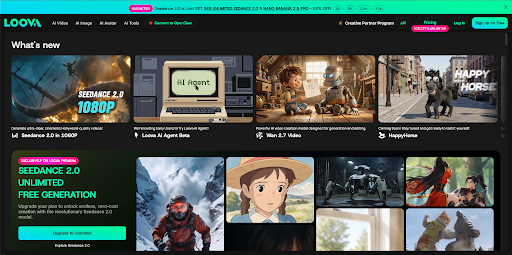
I also use all-in-one platforms like Loova AI because it combines image to video, text to video, and editing tools in one place, which speeds up the entire workflow.
A good prompt usually includes:
- Camera angle (close-up, wide shot)
- Lighting (neon, warm, low light)
- Motion (slow push-in, tracking shot)
- Mood (emotional, tense, calm)
Step 3: Build Character Consistency
One of the biggest challenges in AI filmmaking is keeping the same character across scenes.
My approach:
- Use a reference portrait across all prompts
- Keep clothing and lighting consistent
- Avoid changing environments too drastically between shots
This makes the final film feel like one continuous story instead of random clips.
Step 4: Edit Everything Into a Film
Once I have multiple clips, I move into editing.
For this stage, I use tools like CapCut or Descript.
What I focus on:
- Cutting clips to match music rhythm
- Adding transitions between scenes
- Adjusting pacing for emotional flow
- Syncing lip movement if there is dialogue or singing
This is where the “Netflix feel” really comes alive. Good editing matters more than perfect generation.
Step 5: Add Sound, Music, and Final Polish
Sound design is often ignored, but it changes everything.
I usually add:
- Background music (cinematic or ambient)
- Subtle sound effects (wind, subway noise, footsteps)
- Final color adjustments for mood consistency
Even simple clips feel professional once sound is added properly.
Practical Tips for Better AI Short Films
After making a lot of AI videos, a few patterns became clear.
Write better prompts
Instead of “a person in a subway,” I write:
“A cinematic close-up of a young man inside a dim subway train, neon reflections on glass, slow camera movement.”
Always think in shots
Don’t generate one long scene. Break it into:
- Wide shot
- Medium shot
- Close-up
Keep lighting consistent
Lighting is what makes scenes feel like part of the same film.
Less is more
Simple scenes with strong mood always perform better than complex chaotic ones.
Where AI Filmmaking Is Going
AI filmmaking is moving fast. What used to take a full production team can now be done by a single creator.
I see three clear trends:
- Faster short-form cinematic content
- More creators producing narrative-driven videos
- AI becoming a standard part of filmmaking workflows
Platforms like Loova AI are pushing this even further by combining generation, editing, and creative tools in one system.
Final Thoughts
Creating Netflix-style short films with AI isn’t about replacing filmmaking skills. It’s about speeding up the process and removing technical limits.
Once I understood how to structure scenes, control prompts, and edit properly, AI became less of a tool and more of a creative partner.
FAQ
Can AI really create a short film?
Yes. AI can generate scenes, characters, camera movement, and even help with editing. The final quality depends on how well you structure prompts and edit the output.
What is the best AI video generator for cinematic videos?
There is no single best tool. Many creators combine tools like Runway ML, Kling AI, Veo, and all-in-one platforms like Loova AI depending on the workflow.
How long does it take to create an AI short film?
A simple 10–30 second cinematic short film can be made in a few hours. More polished versions usually take a day or two including editing.
Do I need filmmaking experience?
No. But understanding basic storytelling, framing, and pacing helps a lot. AI handles generation, but you still guide the creative direction.
Can AI short films be used for content creation or social media?
Yes. Many creators use them for YouTube Shorts, TikTok, and brand storytelling because they are fast to produce and visually engaging.