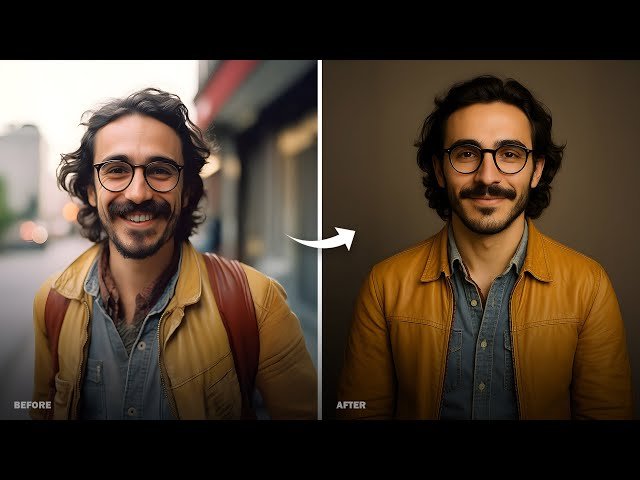
I work as a designer on a small ecommerce team. My daily job is simple to describe and hard to execute: ship product visuals that look real, consistent, and ready for ads, listings, and social. The problem is speed. We constantly need new angles, new moods, and new variations, yet we do not always have time for a full studio shoot. That is the context where PhotoGPT became genuinely useful for me. PhotoGPT stays focused on photoreal results, and it bundles three actions that match real production needs: generate, edit, enhance.
(Create All Type of Photo in PhotoGPT)
What I needed before using PhotoGPT
Ecommerce visuals have a few brutal constraints. The product must look clean. The lighting must look intentional. The background must not fight the subject. The final image must be sharp enough for cropping across placements. If any of those points fail, conversion suffers or the creative gets rejected internally.
The practical pain points
We often get stuck in three places:
- We need an image concept fast, yet sourcing references takes too long.
- We need variations, yet manual editing is slow and inconsistent.
- We have decent images, yet they are not crisp enough for multiple formats.
PhotoGPT maps to those three pain points in a direct way.
PhotoGPT generation in a realistic photo style
The first thing I tested was text to image generation, because that is where most tools either shine or fall apart. PhotoGPT is clearly tuned for a camera like look. It responds well to prompts that describe lighting, lens feel, background simplicity, and a single hero subject.
(Any Photo, Any style, All in PhotoGPT)
How I prompt for ecommerce results
I get the best results when I write prompts like a product photographer. I describe the product placement, background tone, lighting direction, and the level of depth of field. I avoid overloading the scene with too many props. This keeps reflections and texture more believable, and it reduces odd artifacts.


Where generation feels most useful
Generation is most valuable when I need:
- New lifestyle scenes for the same product theme
- Clean studio style shots with consistent framing
- Seasonal variants that keep the product as the hero
- Social friendly visuals that still look like real photos
For a team like mine, the big win is speed. I can generate several options, pick the best two, then move straight into refinement.
PhotoGPT editing for controlled changes
Editing is the second core piece. In ecommerce, you rarely need a dramatic transformation. You need small, controlled changes that keep the image believable. PhotoGPT does best when the edit goal is clear and the scene structure stays stable.
Edits I actually use
The edits that help my workflow:
- Background cleanup and simplification for product focus
- Style adjustments that keep lighting consistent
- Small localized refinements that make the image feel more polished
The important part is blending. If edges look pasted or lighting breaks, the image becomes unusable. PhotoGPT tends to prioritize natural transitions, which is what I want for production assets.
PhotoGPT enhancement for sharper, cleaner outputs
The third core function is enhancement. This matters more than people expect. Even a good image can fail when it is slightly soft, compressed, or uneven in lighting. PhotoGPT enhancement leans toward a natural upgrade, improving clarity and texture without pushing into an overly sharpened or artificial look.
When enhancement saves time
Enhancement is most useful when I already have a workable image and I want:
- Cleaner detail for cropping
- More consistent sharpness across a set
- Better lighting balance without heavy manual correction
This reduces the number of steps in my tool chain. I do not need to jump between multiple apps for basic polish.
Why PhotoGPT feels built for real production
What makes PhotoGPT fit my ecommerce workflow is the consistent focus on realistic photo output. It is not trying to be everything. The platform is tuned for results that look like they were shot with intentional light, believable textures, and sensible composition. That is exactly what product pages, ads, and social creatives need.
The strengths that matter most to me
- Photoreal direction that looks studio leaning, especially in light and texture
- One online flow for generation, editing, and enhancement
- Output that can be used across multiple placements with less rework
- A clear fit for portraits, headshots, lifestyle, product visuals, and ecommerce creatives
RoomDesign for space visuals when the content is about interiors
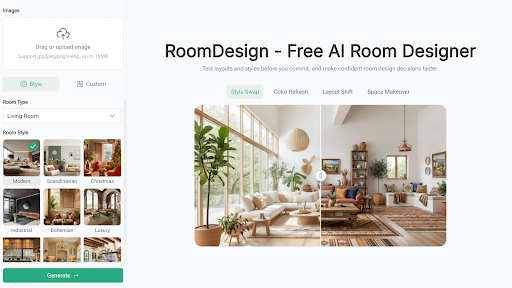
In the same week I was testing PhotoGPT for product assets, I also needed images for a home category campaign. The challenge changed. Products were no longer the hero. The room setting became the story. That is where RoomDesign made more sense. RoomDesign focuses on interior concepts and room focused visuals, so it is useful for home brands, real estate teams, and creators who need clear space direction.
Where RoomDesign helps in a practical way
RoomDesign is strong when you need:
- Fast interior concept exploration for different styles
- Room visuals that support listings, staging ideas, or decor content
- A clearer way to communicate space mood and layout direction
For campaigns that depend on a room feeling, RoomDesign gives a faster path to visuals that look coherent and easy to share.
Closing notes
In my work, PhotoGPT is the tool I reach for when the output must look like a real photo and the workflow needs to stay simple: generate, edit, enhance, all in one place. RoomDesign is the tool I use when the story shifts to interiors and the content needs room focused visuals that communicate style and direction clearly.
PhotoGPT (https://photogpt.io/) delivers a realistic photo centered workflow for generating, editing, and enhancing images online, making it easier to get studio style results for portraits, headshots, lifestyle scenes, and product visuals. RoomDesign (https://roomdesign.io/) supports fast interior concept exploration and room focused visuals, helping creators and teams turn space ideas into clear, shareable designs.