Anyone who has spent hours hunched over a keyboard in a chair that’s too tall, too short, or simply wrong for their body knows the toll it takes — stiff neck, aching lower back, and the kind of fatigue that kills focus mid-game. For gamers of varying heights, finding a chair that genuinely fits is far more complicated than picking one that looks cool or matches a setup’s aesthetic.
- Why Height Matters in Choosing a Heated Gaming Chair
- Essential Features of a Heated Gaming Chair for Any Height
- Adjustable Armrests for Customized Comfort
- Reclining Gaming Chair for Versatile Positioning
- Max Load 330lb: Ensuring Durability and Support
- Heating Cushion Gaming Chair for Enhanced Warmth
- Step-by-Step Guide to Choosing the Right Heated Gaming Chair
- Step 1: Assess Your Height and Body Dimensions
- Step 2: Test Adjustable Features Like Armrests and Reclining
- Step 3: Verify Specifications for Max Load and Heating
- Step 4: Prioritize Long-Term Comfort and Maintenance
- Additional Tips for Height-Variant Gamers
- Finding the Right Fit for Every Gamer
Heated gaming chairs have emerged as a compelling solution, combining ergonomic support with built-in warmth that soothes muscles during marathon sessions. But the real challenge isn’t just finding a heated chair — it’s finding one that works for your specific body. A chair designed without height adaptability in mind can cause as many problems as it solves, regardless of how many features it boasts.
This guide cuts through the noise and walks you through exactly what to look for when selecting a heated gaming chair that accommodates your height and body type. From adjustable armrests and reclining angles to weight capacity and heating cushion quality, every detail matters. Whether you’re on the shorter or taller end of the spectrum, the right chair exists — and this guide will help you find it.
Why Height Matters in Choosing a Heated Gaming Chair
Height isn’t just a number when it comes to gaming chairs — it’s the difference between a setup that supports your body and one that quietly destroys it. Tall gamers frequently deal with backrests that end at shoulder level instead of supporting the neck, seat pans too shallow to distribute thigh weight properly, and armrests that force elbows into awkward angles. Shorter gamers face the opposite problem: feet dangling above the floor, excessive seat depth that cuts circulation behind the knees, and lumbar support that hits somewhere around the mid-back instead of where it actually counts.
These aren’t minor inconveniences. Poor posture sustained over hours of gaming accelerates muscle fatigue, contributes to chronic back pain, and impairs circulation — all of which directly affect reaction time, focus, and overall performance. A chair that fits correctly keeps the spine aligned, shoulders relaxed, and hips at a neutral angle, allowing gamers to sustain longer sessions without the physical cost. When heat therapy is added to that equation, properly positioned heating elements can target the lumbar and upper back precisely where tension accumulates. For a heated gaming chair to deliver its full benefit, it first has to fit the person sitting in it.
Essential Features of a Heated Gaming Chair for Any Height
Not all heated gaming chairs are built with height variability in mind, which is why knowing which features actually matter can save you from an expensive mistake. The right combination of adjustability, structural support, and heating functionality creates a chair that works for your body rather than against it.
Adjustable Armrests for Customized Comfort
Armrests that don’t align with your elbow height force your shoulders into a shrug or a slouch — both of which compound fatigue over long sessions. Look for armrests with at least height and width adjustability, and ideally pivot functionality as well. Taller gamers need a wider vertical range, while shorter users benefit from armrests that drop low enough to keep shoulders relaxed without forcing elbows outward. Multi-directional armrests give every body type the precision fit needed to reduce strain on the neck and upper back.
Reclining Gaming Chair for Versatile Positioning
A reclining function does more than let you lean back — it actively redistributes spinal pressure and accommodates different sitting postures that vary by height and preference. For taller gamers, a wider recline range allows the upper back to fully engage with the backrest rather than hovering above it. Shorter users can recline slightly to bring lumbar support into better contact with the lower back. Look for chairs with a lockable recline range of at least 90 to 160 degrees to maximize positional flexibility during extended gaming sessions.


Max Load 330lb: Ensuring Durability and Support
Weight capacity is a structural consideration that directly affects both safety and long-term durability. A chair rated to a max load of 330lb is built with reinforced frames and denser foam that resist compression over time, which matters for heavier users and those who game for hours daily. Beyond safety, higher weight ratings typically indicate more robust construction across the board — sturdier casters, stronger gas cylinders, and more resilient upholstery. Choosing a chair with adequate load capacity ensures the ergonomic geometry holds up under real use rather than degrading after a few months.
Heating Cushion Gaming Chair for Enhanced Warmth
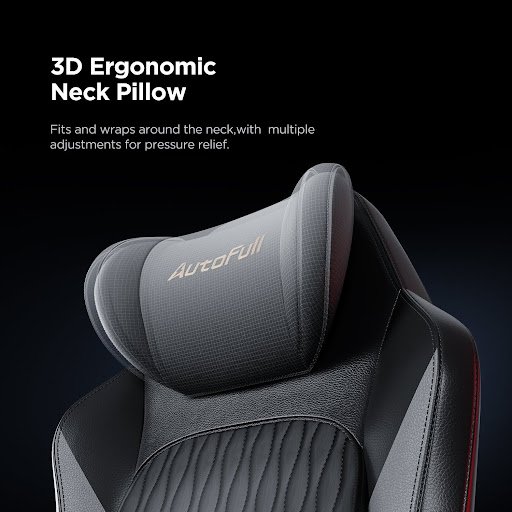
A built-in heating cushion transforms a gaming chair from a purely ergonomic tool into an active recovery asset. Heat applied to the lumbar and back regions increases circulation, relaxes muscle tension, and reduces stiffness during cold-weather sessions or long stationary periods. Brands like AutoFull have approached this by integrating heating elements directly into the chair’s ergonomic structure, ensuring warmth is delivered where the body needs it most rather than as a superficial addition. When evaluating heating features, prioritize chairs with adjustable temperature settings and auto shut-off timers as essential safety measures. Even heat distribution across the cushion surface matters — uneven heating creates hot spots that become uncomfortable quickly. A well-designed heating element should complement the chair’s ergonomic support rather than functioning as a simple add-on.
Step-by-Step Guide to Choosing the Right Heated Gaming Chair
Selecting the right heated gaming chair requires more than browsing specifications — it demands a methodical approach that accounts for your unique body dimensions and gaming habits. Following these steps will help you cut through marketing language and identify a chair that genuinely delivers.
Step 1: Assess Your Height and Body Dimensions
Before comparing chairs, measure yourself accurately. Note your height, inseam length, and shoulder width, then cross-reference these against a chair’s seat height range, seat depth, and backrest height. For taller users, prioritize chairs with a seat height that allows feet to rest flat on the floor without the knees rising above hip level. Shorter users should confirm that minimum seat height brings them close enough to their desk without strain. These measurements eliminate guesswork and immediately narrow your options to chairs built for your proportions.
Step 2: Test Adjustable Features Like Armrests and Reclining
If purchasing in-store, physically test the armrest range and recline resistance before committing. Online buyers should scrutinize user reviews specifically from people who share your height range — their feedback on whether armrests reach low enough or the recline feels supportive at various angles is more reliable than manufacturer descriptions. Look for video reviews that demonstrate the full adjustment range in motion. A chair’s adjustability only matters if its range actually covers your body’s requirements, so confirm the specifics rather than assuming broad compatibility.
Step 3: Verify Specifications for Max Load and Heating
Check the chair’s weight capacity and ensure it comfortably exceeds your own weight — a buffer of at least 50lb beyond your body weight is a reasonable baseline for structural longevity. For the heating system, confirm the number of heat zones, available temperature settings, and whether an auto shut-off feature is included. Look for safety certifications on the heating components and read user feedback about how consistently the heat distributes across the cushion surface. Verified specifications and real-world reviews together give a complete picture that product pages alone rarely provide.
Step 4: Prioritize Long-Term Comfort and Maintenance
Material quality determines how well a chair holds up after months of daily use. PU leather and breathable mesh each have trade-offs — leather is easier to wipe clean around heating elements, while mesh resists heat retention better in warmer environments. Confirm whether the heating cushion is removable for cleaning, and check if replacement parts are available. Review the warranty terms carefully, particularly whether it covers mechanical components like the heating system and gas cylinder. A strong warranty signals manufacturer confidence in the product’s durability under sustained use.
Additional Tips for Height-Variant Gamers
Even the best-fitted heated gaming chair benefits from a few supporting adjustments. Shorter gamers should consider a quality footrest to maintain proper leg positioning when seat height can’t drop low enough. Taller users can pair their chair with a height-adjustable desk to keep monitor and keyboard at optimal angles. Periodically re-examine your chair’s adjustments as gaming habits evolve — what felt right six months ago may need refinement. Clean heating elements regularly following manufacturer guidelines to preserve performance, and inspect gas cylinders and casters every few months to catch wear before it compromises the ergonomic fit you’ve dialed in.
Finding the Right Fit for Every Gamer
Choosing a heated gaming chair that genuinely fits your height isn’t a luxury — it’s a practical investment in both performance and long-term physical health. Throughout this guide, the core message has remained consistent: a chair that doesn’t match your body dimensions will undermine every other feature it offers, no matter how advanced the heating system or how premium the materials.
The key takeaways are straightforward. Height-specific ergonomic challenges demand adjustable solutions — multi-directional armrests, a wide reclining range, and a seat height that places your feet flat on the floor. A max load rating of 330lb signals structural durability that holds up under real daily use, while a well-integrated heating cushion with adjustable temperature settings and safety shut-off adds genuine recovery value to your sessions. Following a measured, step-by-step selection process — from assessing your body dimensions to verifying specifications and long-term maintenance requirements — removes the guesswork that leads to costly regrets.
Every gamer, regardless of height, deserves a setup that works with their body rather than against it. Use this guide as your framework, apply the steps methodically, and you’ll be positioned to make a confident, informed decision that pays off every hour you spend in the chair.