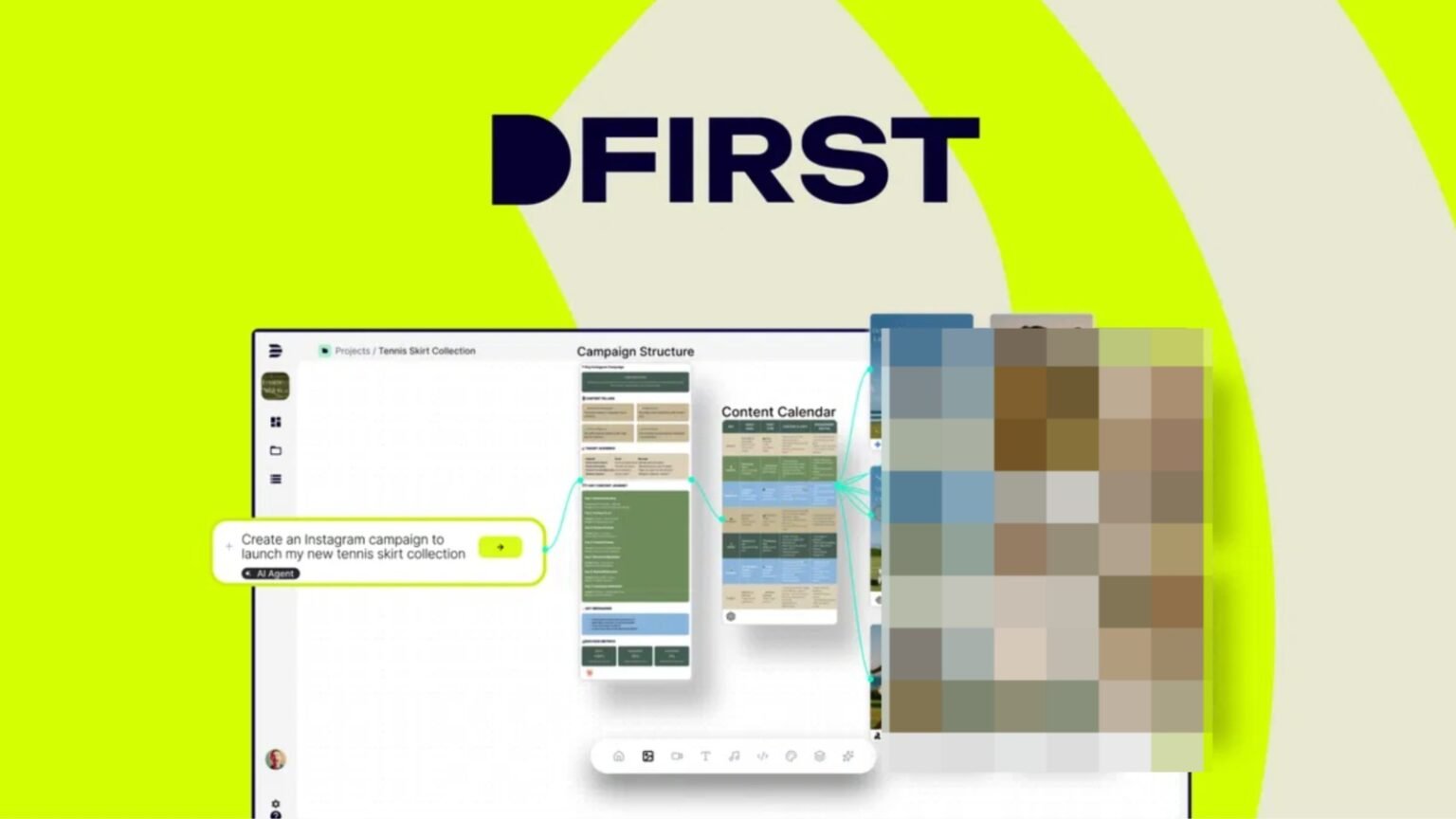
Dfirst is an AI marketing content creation platform. It generates blogs, social media posts, videos, and product images. The platform uses artificial intelligence to speed up content production. You start with an idea. The system builds complete campaigns around it. Blog articles get written automatically. Social media carousels get designed. Video ads get created. Product mockups appear ready to use. The platform combines writing tools with image editing features. Background removal works automatically. Image quality gets enhanced through upscaling. Objects can be edited or added through AI inpainting. Small businesses save time on content creation. Marketing teams produce more with fewer resources. Freelancers handle multiple clients without hiring help. Dfirst targets anyone who creates marketing content regularly. The tool replaces several separate subscriptions with one platform.
- Dfirst Pros & Cons:
- Dfirst Monthly Pricing:
- 12 Key Features of Dfirst:
- 01. Idea-to-Campaign Engine
- 02. SEO Blog Generation
- 03. Social Media Carousels
- 04. Video Ads Creation
- 05. Product Mockup Builder
- 06. Image Upscaling Enhancement
- 07. Background Removal Automation
- 08. Object Edit Inpainting
- 09. Outpainting Scene Expansion
- 10. Multiple Creative Variations
Dfirst Pros & Cons:
Pros :
- One whiteboard shows all campaigns and assets together.
- Handles blogs, ads, social, and visuals in one place.
- Brand kit keeps style and voice consistent.
- Flexible pricing with monthly plans and lifetime deals.
- Great fit for agencies, e‑commerce, and SaaS teams.
Cons:
- Many features can feel heavy for brand‑new users.
Dfirst Monthly Pricing:
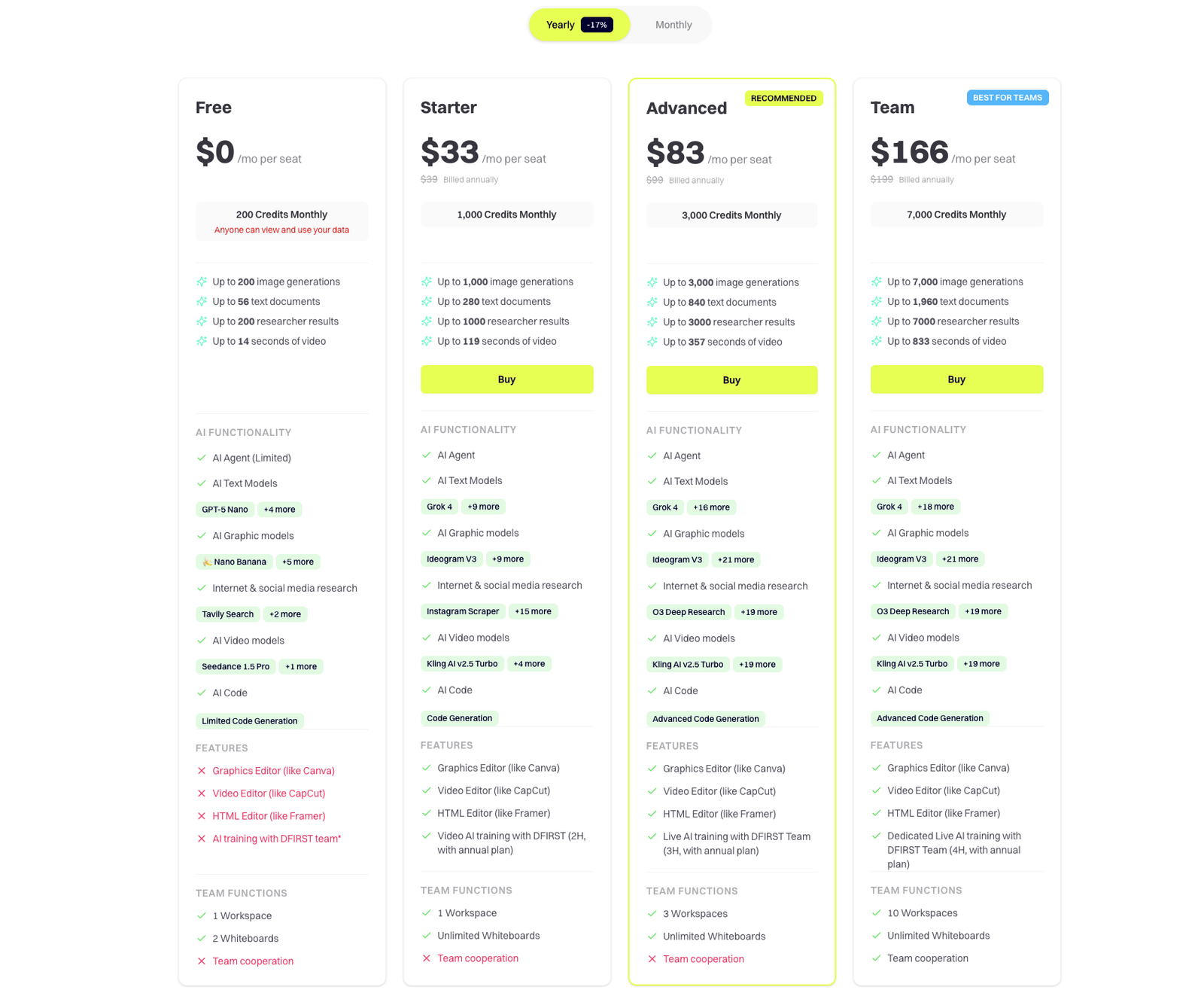
The regular Dfirst monthly pricing follows standard SaaS models. Plans start around $33 per month for basic access. Professional plans reach $83 monthly for more features. Enterprise options go higher with custom pricing. Annual billing offers some discount over monthly. Most features appear in all paid plans. The main difference shows in generation limits. Monthly costs add up to hundreds yearly.
12 Key Features of Dfirst:
01. Idea-to-Campaign Engine
The idea-to-campaign engine transforms simple concepts into complete marketing campaigns. You enter your product name or business idea. The AI analyzes your input and builds a full campaign strategy. By the way, this feature saves massive planning time. No more staring at blank pages. The system suggests blog topics, social post angles, and ad concepts. The engine creates content calendars automatically. It maps out what to post and when. Each piece connects to your main campaign theme. Everything stays consistent across platforms. Another way to use this: brainstorm new product launches. Enter your product details and target audience. The system generates launch campaign ideas instantly. You pick what fits your brand best. The technology behind this uses natural language processing. It understands context and brand voice. Your campaigns sound human, not robotic. Each suggestion can be edited and customized. Marketing agencies love this feature most.
02. SEO Blog Generation
SEO blog generation creates search-optimized articles automatically. You provide a topic or keyword. Dfirst writes complete blog posts that rank on search engines. The system researches keywords before writing. It finds related terms people actually search for. These terms get naturally included throughout the article. Search engines understand what your content covers. Speaking of which, the articles follow SEO best practices. Headings get structured correctly. Meta descriptions get created automatically. Image alt text gets suggested. Everything Google wants to see. Each blog post gets written in conversational style. The content reads like a human wrote it. No awkward keyword stuffing. Sentences flow naturally from one to the next. You control the tone and length. Business professional or casual friendly. Short 500-word posts or deep 2000-word guides. The AI adapts to your requirements. The feature includes fact-checking suggestions. It prompts you to verify statistics and claims. This keeps your content accurate and trustworthy. Your readers get reliable information.
03. Social Media Carousels
Social media carousels get designed automatically through this feature. You provide your message or content points. The system creates multi-slide carousel posts ready to share. Last week, I tested this with product features. I listed five benefits and uploaded one product image. Dfirst created a professional ten-slide carousel. Each slide highlighted one benefit with engaging visuals. The templates match current design trends. Clean layouts with bold typography. Color schemes that grab attention. Professional polish without hiring a designer . You can customize every element. Change colors to match your brand. Swap fonts to fit your style. Add your logo to each slide. The flexibility lets your brand shine through. The system suggests content structure too. It knows which information works on which slides. Hook slides come first to grab attention. Call-to-action slides finish strong. Platform optimization happens automatically. Instagram carousel dimensions differ from LinkedIn. The tool exports correct sizes for each platform. No manual resizing needed.


04. Video Ads Creation
Video ads creation turns static content into moving advertisements. You provide images and text. The platform creates video ads ready for social media. The process starts simple. Upload your product images or brand photos. Write your ad message. Choose your video style. The AI assembles everything into a video. That reminds me of traditional video editing. It requires expensive software and training. Most small businesses can’t afford professional video editors. This tool removes that barrier completely. Multiple video formats are generated simultaneously. Square videos for Instagram feed. Vertical videos for Stories and Reels. Horizontal videos for YouTube. Each format gets exported automatically. Background music gets added from royalty-free libraries. You pick the mood you want. Upbeat and energetic or calm and professional. The music matches your brand message. Text animations make your message pop. Important words get highlighted with motion. Viewers stay engaged throughout the entire ad. Attention doesn’t drift away. The video quality rivals professional productions. Transitions flow smoothly between scenes. Colors stay vibrant and eye-catching. No pixelation or quality loss.
05. Product Mockup Builder
Product mockup builder places your designs on realistic product images. T-shirts, mugs, phone cases, posters. Your artwork appears on professional product photos.
To be fair, mockup creation used to need Photoshop skills. Templates cost money individually. Each product type needed separate purchases. This gets expensive fast. The mockup library includes hundreds of options. Apparel mockups show your designs on models. Tech mockups display your app on devices. Print mockups showcase your posters framed.
Customization goes deep. Change background colors and lighting. Adjust product angles and perspectives. Add shadows for realistic depth. Everything looks professionally photographed. E-commerce sellers use this feature constantly. Product photos need to look amazing. Good mockups increase conversion rates significantly. Customers visualize owning the product better.
The rendering quality impresses every time. No obvious digital insertion. Your design blends naturally with the product. Lighting and shadows match perfectly.Print-on-demand businesses benefit most here. They need mockups for every new design. Creating these manually takes forever. This feature generates them in seconds.
06. Image Upscaling Enhancement
Image upscaling enhancement increases image resolution without quality loss. Small images become large, crisp, high-resolution files. Perfect for print materials and large displays. The technology uses AI to add detail intelligently. It doesn’t just stretch pixels. The system analyzes the image and reconstructs detail. Edges stay sharp and clear.
On the other hand, traditional upscaling creates blurry messes. Pixelation ruins the image completely. You can’t use those files professionally. This AI method preserves quality beautifully. The feature saves images you thought were unusable. That perfect photo from a client? Too small for your banner. Upscale it and use it anyway. Print designers need this feature regularly. Print requires much higher resolution than web. A web image at 72 DPI looks terribly printed. Upscaling brings it to print-ready 300 DPI. The processing happens fast. Upload your image and select your target size. Wait a few seconds. Download your enhanced high-resolution version. You can upscale up to 4x the original size. A 500-pixel image becomes 2000 pixels. Quality stays sharp throughout the enlargement. Colors remain true and accurate. Photographers and designers praise this tool.
07. Background Removal Automation
Background removal automation strips backgrounds from images automatically. Product photos get clean white backgrounds. Person cutouts happen with one click. No manual selection needed. The AI detects edges with incredible accuracy. Hair strands get preserved perfectly. Complex shapes get handled easily. The results look hand-edited by professionals. Come to think of it, manual background removal takes serious time. Photoshop requires careful selection and refinement. One image might take twenty minutes. This feature does it in seconds. E-commerce product photos need clean backgrounds. Amazon requires white backgrounds for main images. This tool prepares products for listing instantly. Your products look professional and consistent. The feature handles transparent backgrounds too. PNG files with transparency export perfectly. You can overlay products on any background later. Maximum flexibility for future use.
Batch processing saves even more time. Upload twenty product photos at once. Remove all backgrounds simultaneously. Download the entire batch ready to use. Quality stays consistent across all images. No variation between different photos. Your product catalog looks unified and professional. Customers get a better shopping experience.
08. Object Edit Inpainting
Object edit inpainting removes or adds objects in images using AI. Unwanted items disappear seamlessly. New objects get added naturally. The image looks untouched by editing. The way I see it, this is like magic. You select an object you want removed. The AI fills that space with a matching background. No trace of the original object remains. The technology analyzes surrounding pixels. It understands patterns, textures, and lighting. The fill matches perfectly with the rest of the image. No obvious patching or cloning. Product photographers love this feature. Remove distracting elements from product shots. That random shadow or reflection? Gone in seconds. Your product shines as the star. You can add objects too. Want a prop in your scene? Paint where it should go. The AI generates appropriate objects. Results look naturally photographed. Real estate photos get improved dramatically. Remove furniture from empty room shots. Add furniture to show potential. Buyers visualize the space better. The interface works simply. Paint over what you want changed. Describe what should appear instead. The AI does the heavy lifting. You review and approve the result.
09. Outpainting Scene Expansion
Outpainting scene expansion extends images beyond their original borders. Your image grows larger with AI-generated content. The expansion matches the original style perfectly. Just between you and me, this feature feels like science fiction. You have a portrait but need landscape orientation. Outpainting adds sides naturally. The scene extends believably.
The AI studies your existing image carefully. It understands the style, lighting, and subject matter. New sections match seamlessly with original content. Nobody can tell where the original ends. Social media formats change constantly. Your perfect square image needs to be vertical now. Outpainting adjusts it without cropping important elements. Everything fits the new format. Background scenes get completed beautifully. You have a subject but limited background? Expand outward for more environment. The AI generates appropriate scenery. The technology respects perspective and composition. New areas follow the same vanishing points. Lighting direction stays consistent. The result looks photographed this way originally. Designers use this for flexible compositions. Create one image, then adapt it everywhere. Different aspect ratios for different platforms. One source file has many variations.
The feature saves photoshoot planning time. You don’t need to shoot every possible crop. Capture the subject well. Expand later as needed. Maximum flexibility after the fact.
10. Multiple Creative Variations
Multiple creative variations generate different versions of your content automatically. One input produces many outputs. Each variation offers a fresh take on your message. All things considered, this beats the creative block completely. You’re stuck on how to present something. Generate ten variations and pick the best. Fresh ideas appear instantly. The system varies colors, layouts, and styles. Same message, different visual approaches. Some bold and bright, others subtle and elegant. Options suit different audiences. A/B testing becomes easier than ever. Create multiple ad versions simultaneously. Test them against each other. Data shows which performs best. Your marketing improves through testing. Social media posting stays fresh and varied. Don’t post the same-looking content repeatedly. Variations keep your feed interesting. Followers stay engaged with visual diversity. The feature understands brand consistency too. Variations stay within your brand guidelines. Colors come from your brand palette. Fonts stay on-brand. Everything looks cohesive despite differences. Marketing campaigns need multiple touchpoints. One creative approach won’t reach everyone. Variations hit different personality types. Your message reaches broader audiences.
Dfirst feels like a solid hub for modern marketing teams. It brings blogs, ads, visuals, and social content into one shared workspace, so campaigns stay connected instead of scattered. The AI tools help teams draft faster while brand kits keep style consistent. For agencies, SaaS, and e‑commerce brands, this can cut production time and tool fatigue. If someone wants one place to plan and create multi-channel campaigns, Dfirst deserves a serious look.