SlidesGPT is a solid AI PPT generator that turns text into slides quickly.
But many users look for alternatives because the output can feel basic, template-heavy, or lacking structure for real presentations.
If you need better slides for work, here are the best SlidesGPT alternatives in 2026.
1. Dokie AI — Best for structured, business-ready slides
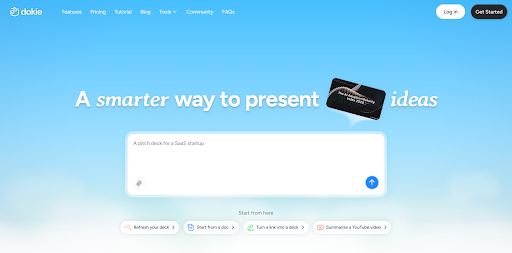
Dokie AI is the strongest alternative if you care about usable presentations, not just generated ones.
SlidesGPT is good at turning text into slides, but the output often needs editing. Dokie focuses on building a clear structure—intro, key points, data, and summary—so the slides are closer to ready for real meetings.
It also exports clean PowerPoint files, which is important for business use.
Pros
- Strong structure (less rework)
- Business-ready output
- Clean PPT export
Cons
- Less focused on visual-heavy designs
2. Gamma — Best for fast slide generation
Gamma is one of the fastest AI presentation tools.



You can input a prompt and get a full deck in seconds. It is great for brainstorming and quick drafts, and widely used for modern presentations.
However, similar to SlidesGPT, the structure may need refinement before real use.
Pros
- Very fast
- Easy to use
- Modern layout
Cons
- Needs editing for business decks
- Less traditional PPT format
3. Canva — Best for visual presentations
Canva is a strong alternative if you care about design and ease of use.
It offers AI generation plus a large template library, making it easy to create visually appealing slides. It is often recommended alongside other AI tools for presentation creation.
Pros
- Beginner-friendly
- Huge template library
- Strong visual output
Cons
- Less structured content
- More manual editing needed
4. Plus AI — Best for Google Slides workflow
Plus AI works directly inside Google Slides and PowerPoint.
If your workflow is already based on these tools, it is a better alternative than SlidesGPT because you don’t need to export and re-edit slides.
It focuses on editing and generating slides within your existing workflow.
Pros
- Native integration
- Smooth workflow
- Good for teams
Cons
- Depends on Google Slides or PowerPoint
5. Beautiful.ai — Best for design automation
Beautiful.ai is a good choice if you want clean, polished slides automatically.
It uses smart layouts that adjust spacing and alignment, helping maintain design consistency.
Pros
- High-quality design
- Auto layout adjustment
- Easy to use
Cons
- Limited flexibility
- Can feel template-driven
How to choose the right SlidesGPT alternative
Here’s a simple breakdown:
- Need real PPT for work → Dokie AI
- Need speed → Gamma
- Care about visuals → Canva
- Use Google Slides → Plus AI
- Want polished design → Beautiful.ai
The main difference is this:
SlidesGPT focuses on text → slides, while better alternatives focus on slides → usable presentations.
Final thoughts
SlidesGPT is useful for quick generation, but many users outgrow it when they need better structure and real presentation quality.
If your goal is just speed, tools like Gamma or Canva are enough. But if you want slides that are ready for real meetings, tools like Dokie AI offer a much better experience.
FAQs
- What is SlidesGPT used for?
SlidesGPT is an AI tool that turns text into PowerPoint or Google Slides automatically. - Why look for SlidesGPT alternatives?
Users often want better structure, cleaner design, or stronger PPT export. - Which SlidesGPT alternative is best for business use?
Dokie AI is a strong choice for structured, presentation-ready slides. - Are these tools free?
Most offer free plans, but advanced features require payment. - Can these tools replace PowerPoint?
Not fully. They help generate slides, but PowerPoint is still used for editing and presenting.