How a single AI agent took over my customer onboarding, social monitoring, and lead qualification – and cut $347/month from my software bill.
- The SaaS Stack I Was Running (And Why It Bothered Me)
- Tool #1: Customer Onboarding (Goodbye, Intercom)
- Tool #2: Social Monitoring (Goodbye, Mention)
- Tool #3: Lead Qualification (Goodbye, Overpriced Scoring Tool)
- What Went Wrong (Because Something Always Does)
- The Honest Math
- Where This Approach Falls Apart
- What I’d Tell You Before You Start
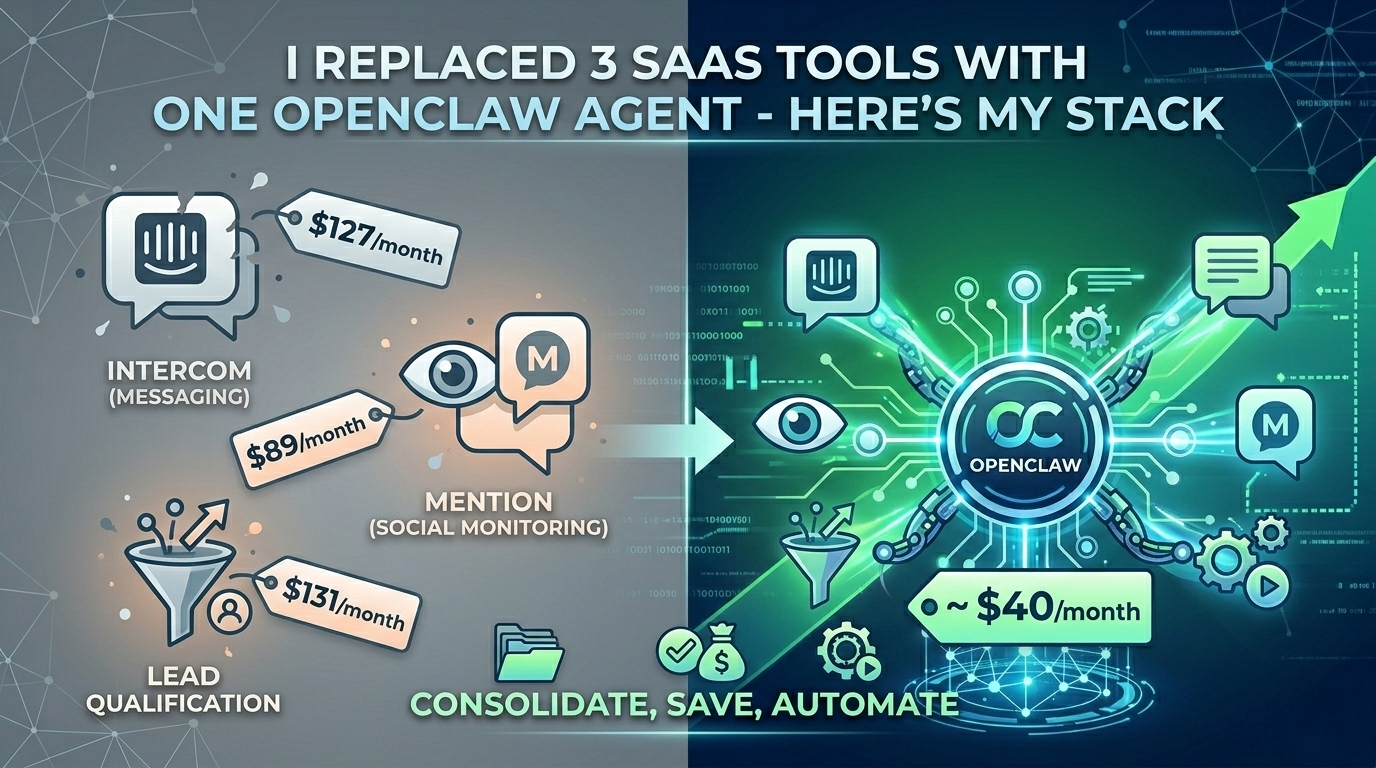
Last November, I was paying $127/month for Intercom, $89/month for Mention, and $131/month for a lead qualification tool I’d rather not name. That’s $347/month – $4,164/year – on three SaaS products that each did exactly one thing.
Today, a single OpenClaw agent handles all three jobs. My monthly cost? The API tokens it burns through, plus hosting. Total: around $40.
I’m not telling you this to brag. I’m telling you because the “OpenClaw will nuke SaaS startups” narrative floating around Twitter and Hacker News isn’t just hype. For a specific category of tools – ones that follow predictable workflows, react to triggers, and produce templated outputs – it’s already happening.
Here’s exactly how I set it up, what went wrong along the way, and where this approach falls apart.
The SaaS Stack I Was Running (And Why It Bothered Me)
Some context. I run a small B2B product with around 400 monthly signups. My workflow looked like this:
Intercom handled new user onboarding – welcome messages, drip sequences, and answering the same 15 questions that hit our chat widget every day. Mention tracked brand mentions across Twitter, Reddit, and a handful of niche forums so I could jump into conversations. The lead qual tool scored incoming signups based on company size, role, and behavior patterns, then routed hot leads to my inbox.
Three tools. Three dashboards. Three billing cycles. And the thing that really got to me: 80% of what these tools did was pattern matching and templated responses. The exact kind of work that large language models are terrifyingly good at.



When OpenClaw crossed 230,000 GitHub stars and I saw the community building skills for everything from email management to social media monitoring, I decided to run an experiment.
Tool #1: Customer Onboarding (Goodbye, Intercom)
This was the easiest replacement. OpenClaw’s architecture – the perceive-think-act-reflect loop – is practically built for conversational workflows. I configured an agent with my product’s documentation as context, connected it to our website chat via the Slack integration (piped through a simple webhook), and gave it a system prompt that covered our 15 most common questions.
The key was persistent memory. Unlike a basic chatbot, OpenClaw agents remember previous conversations. A user who asked about pricing on Monday and came back about integrations on Thursday got a contextually aware response. That’s something my Intercom setup never did well without expensive custom flows.
For anyone exploring which OpenClaw skills and plugins work best for customer-facing automation, the community-built conversation and support skills were my starting point. I customized from there, but didn’t build from scratch.
Result: Response time dropped from 4-6 hours (me checking Intercom between tasks) to under 30 seconds. Customer satisfaction actually went up – because the agent was available 24/7 and didn’t give inconsistent answers depending on how tired I was.
Tool #2: Social Monitoring (Goodbye, Mention)
This one was trickier. Mention’s value wasn’t just finding brand mentions – it was filtering signal from noise across multiple platforms.
I built an OpenClaw skill that monitors specific subreddits, Twitter search queries, and a few Hacker News keywords on a scheduled loop. When it finds a relevant mention, it drafts a contextual response, sends it to me on Telegram for approval, and posts it once I give the thumbs up.
Here’s the part nobody mentions about this approach: the drafts are good. Not “impressive for AI” good – actually usable good. Because the agent has access to my product docs, past responses, and brand voice guidelines in its memory, the replies sound like me. I approve about 70% without edits.
The 30% I edit? Usually because the agent is too polite. Indie hackers on Reddit can smell corporate-speak from a mile away.
Result: I went from checking Mention once a day (and missing time-sensitive conversations) to engaging within minutes of a mention appearing. My reply rate to relevant threads tripled.
Tool #3: Lead Qualification (Goodbye, Overpriced Scoring Tool)
Stay with me here, because this is where it gets interesting.
Lead qualification sounds complex, but my criteria were actually straightforward: company size above 10 employees, specific job titles (founder, head of product, CTO), and certain behavioral signals (visited pricing page, signed up with a company email, used the product more than twice in the first week).
I connected my OpenClaw agent to our signup webhook and gave it access to a lightweight enrichment API (Clearbit’s free tier handles the company data). The agent evaluates each signup against my criteria, assigns a simple hot/warm/cold tag, and sends hot leads to a dedicated Slack channel with a one-paragraph summary of why they qualified.
This replaced a tool that charged me $131/month to do essentially the same thing with a prettier dashboard.
Result: Lead response time for hot prospects dropped from “whenever I check the dashboard” to instant Slack notification. I closed two deals in the first month that I’m confident I would have missed with my old delayed workflow.
What Went Wrong (Because Something Always Does)
I’d be lying if I said this was smooth.
First problem: hosting. I initially self-hosted OpenClaw on a $24/month DigitalOcean droplet. Setting up Docker, configuring YAML files, managing SSL, and keeping the agent running through restarts ate an entire weekend. Then a security advisory dropped – CVE-2026-25253, a remote code execution vulnerability – and I realized I’d need to actively maintain this thing.
I eventually moved to a managed deployment service. Options range from DigitalOcean’s 1-Click setup to dedicated platforms – Better Claw’s OpenClaw hosting alternative and xCloud are the two I evaluated. I went with managed hosting because my time debugging Docker configs is worth more than $19-24/month, and I wanted sandboxed execution after reading about the ClawHavoc campaign that found 824 malicious skills on ClawHub.
Second problem: agent hallucinations in customer chat. In the first week, my onboarding agent confidently told a user we had a Zapier integration. We don’t. I added explicit guardrails in the system prompt: “If you are not 100% certain about a feature, say ‘Let me check with the team and get back to you’ and flag the conversation for human review.”
Hallucinations dropped to near zero after that. But it was a reminder that autonomous agents need boundaries, especially when they’re customer-facing.
Third problem: API costs are variable. SaaS tools have predictable monthly bills. OpenClaw agents burn API tokens proportional to their activity. During a viral Reddit thread about my product, the social monitoring agent’s API costs spiked to $18 in a single day. Still cheaper than Mention’s monthly fee, but the unpredictability takes getting used to.
The Honest Math
Here’s my before-and-after:
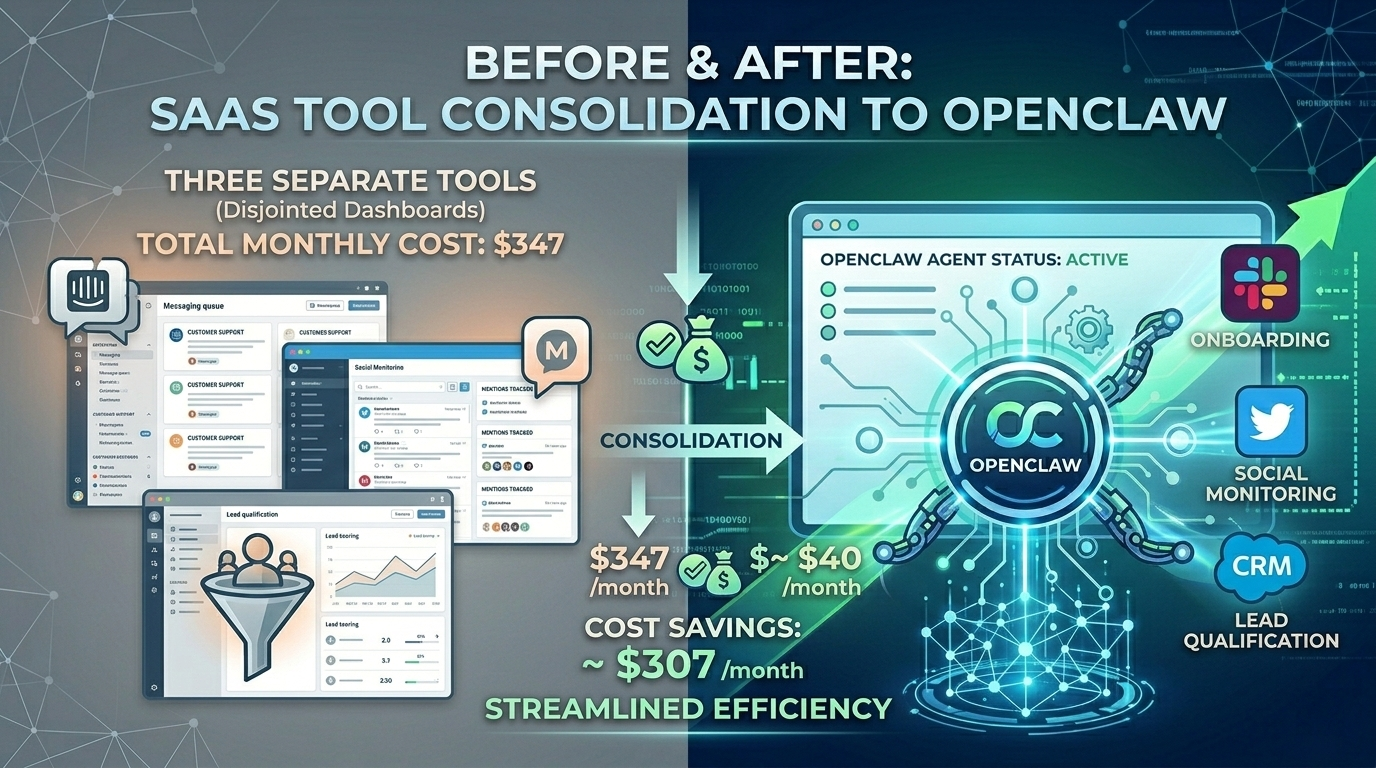
Before: $347/month across three SaaS tools.
After: ~$40/month (managed hosting + average API costs).
That’s a savings of roughly $3,600/year. For a bootstrapped founder, that’s real money.
But the bigger win isn’t the cost savings. It’s the consolidation. One agent. One configuration. One place where my business logic lives. When I want to change how lead qualification works, I update a system prompt – not navigate three different SaaS dashboards with three different UIs and three different support teams.
Where This Approach Falls Apart
I want to be honest about the limitations, because the “replace all SaaS with AI agents” narrative oversimplifies things.
Complex analytics? OpenClaw isn’t replacing your Mixpanel or Amplitude. Agents are great at acting on data, not at building interactive dashboards and cohort analyses.
Team collaboration tools? Your OpenClaw agent isn’t replacing Notion or Linear. These tools have value in their UI and collaboration features, not just their underlying logic.
Anything requiring deep platform integrations? If a SaaS tool’s primary value is its API connections to 200+ other services, an OpenClaw agent can’t replicate that overnight.
The sweet spot is workflow-heavy, logic-light SaaS – tools where you’re mostly paying for automation that follows predictable rules. Customer support triage, social monitoring, lead routing, appointment scheduling, basic reporting. If you can describe the workflow in a paragraph, an OpenClaw agent can probably handle it.
What I’d Tell You Before You Start
Don’t try to replace everything at once. Pick your most expensive SaaS tool that does the simplest job. Build an agent for that one use case. Run them in parallel for two weeks. Compare the outputs.
If the agent holds up – and for workflow-driven tasks, it probably will – cancel the subscription and move to the next one.
The OpenClaw community has 44,000+ forks and skills for almost every common automation pattern. You’re probably not the first person trying to automate your specific workflow. Search ClawHub before building from scratch – just vet the skills carefully given the recent malware findings.
The SaaS model isn’t dying. But for solo founders and small teams running predictable workflows, the math has changed. If you don’t want to manage infrastructure yourself, managed OpenClaw deployment platforms like Better Claw and xCloud let you go from zero to a running agent in under a minute, no Docker setup, no YAML configs, no server maintenance. That lowers the barrier enough that even non-technical founders can run this experiment.
A $19-40/month AI agent doing the work of $300+ in SaaS subscriptions isn’t a theoretical future. It’s a Tuesday afternoon project.
The tools haven’t gotten worse. The alternative just got dramatically better.