
A store can send a polished campaign every Friday and still ignore the moments when a customer is most ready to hear from it. A first-time subscriber needs orientation. A shopper who leaves a checkout may need reassurance. A new buyer needs help using what they bought. A previous customer may need a reason to return. Sending the same promotion to all four wastes attention and often trains people to wait for discounts.
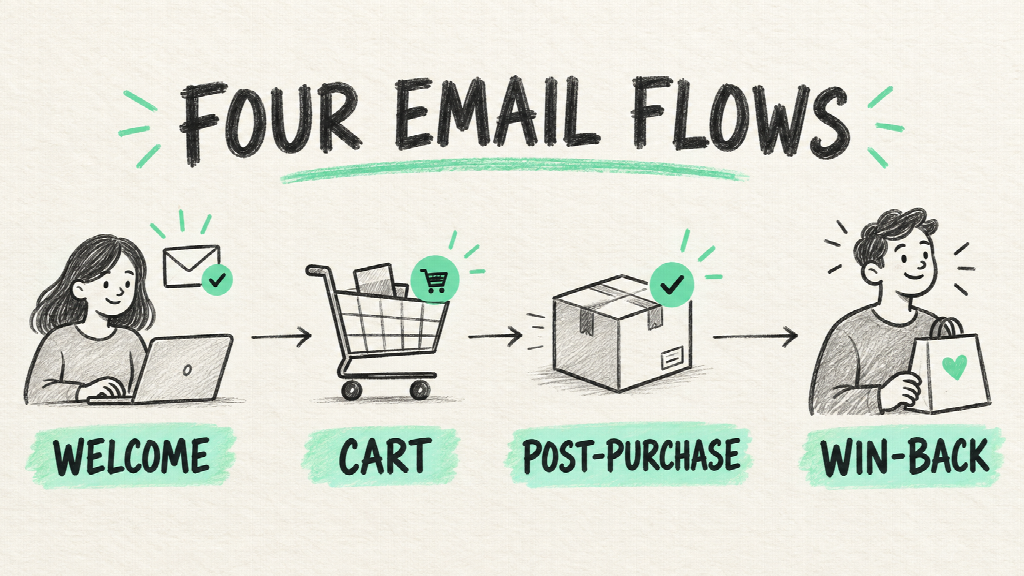
For a small Shopify team, the useful starting point is four lifecycle flows: welcome, cart or checkout recovery, post-purchase, and win-back. Each flow begins with a customer action, has a specific job, and should stop when that job is no longer relevant. The work is less about writing a large stack of emails than about getting the triggers, exclusions, and promises right.
Agent Skills can help turn that planning into a repeatable brief. A directory such as NanoSkill’s marketing Agent Skills catalog lets teams compare email workflow instructions and their source packages before choosing one to test. The resulting plan still needs a person to verify against the store’s actual data and messaging platform.
Each flow earns its place by responding to a different customer moment.
Start With Events, Not Email Templates
Shopify distinguishes a product browse, an abandoned cart, and an abandoned checkout. Those are different signals. Someone who viewed a mug has shown curiosity; someone who entered checkout has shown stronger purchase intent, but might have encountered shipping cost, payment friction, or an interruption. One generic “you forgot something” message cannot speak accurately to every stage.
Write a one-page flow brief before opening an email editor. For each flow, record the entry event, who is eligible, who must be excluded, the customer’s likely question, the desired action, and the exit condition. The exit condition is essential: a customer who has purchased should not continue receiving reminders to buy the same item. This brief also exposes missing data. If the store cannot distinguish a first purchase from a repeat purchase, a highly tailored post-purchase sequence is premature.
The four flows can be introduced in sequence rather than all at once. Build the event definitions, test the exclusions, send test messages, and confirm what appears in the reporting view. Only then add complexity such as product-based branches or VIP segments.
1. Welcome: Fulfill the Signup Promise
A welcome sequence should begin with the reason someone subscribed. If the form promised a care guide, deliver the guide. If it promised early access, explain what early access means. If it offered a discount, make the terms clear. The first email should not demand that a new reader learn the entire brand story before receiving what they signed up for.


A practical sequence has three jobs. The first email fulfills the promise and points to one useful next step. The second answers a buying question, perhaps by explaining materials, fit, shipping, or how products are made. The third offers proof: a relevant customer review, a comparison, or a short demonstration. A fourth message is justified only when the buyer still has an unresolved decision. Do not add it to satisfy an arbitrary “four-email” template.
Keep subscribers who have already purchased out of first-purchase offers. Consider whether the same signup source should lead to the same message: a person joining from a product-specific page may need different guidance from someone who entered through a broad editorial article. A reusable Skill can draft branches and subject lines, but the store must confirm that the segmentation fields really exist in its email platform.
Segmentation prevents a useful message from arriving at the wrong stage.
2. Recovery: Match the Message to the Exit Point
Recovery emails work best when they remove uncertainty. A browse reminder might help a visitor compare two options or answer a product question. A cart reminder can restore the saved items and explain shipping or returns. A checkout reminder can focus on completion friction. The content should reflect what the store knows, not invent a reason the customer left.
Make the distinction visible in the workflow:
| Exit point | What the store knows | Useful first response |
| Product browse | An item was viewed | Help the shopper decide whether it fits |
| Cart | An item was added | Restore context and answer practical objections |
| Checkout | Checkout began | Offer a clear path back and address completion friction |
Shopify provides separate automation types for these stages. Its current guidance also makes eligibility and channel settings part of the setup, so a merchant should check consent and recipients in the actual admin rather than copying a generic rule from an article. Use a test customer to inspect the real message and destination link. If the product is out of stock, the reminder should not encourage a purchase that cannot be completed.
Resist the reflex to lead with a coupon. First examine the checkout itself. A confusing delivery date, unexpected fee, weak mobile layout, or unclear returns policy will remain a problem after the discount disappears. Recovery automation should reveal those issues through patterns in exits and responses, then support a page or checkout fix.
The closer a shopper gets to purchase, the more specific the recovery message can be.
3. Post-Purchase: Help Before You Sell Again
The first message after purchase should reduce buyer anxiety. Confirm what happens next, set delivery expectations, and make support easy to find. Once the order arrives, explain setup, care, sizing, or use. That message often does more for retention than an immediate recommendation to buy something else.
Recommendations become useful when tied to the item bought and the time needed to experience it. A kitchenware seller might send a care guide, then a recipe, then a compatible accessory. A replenishable product might justify a reminder near a reasonable reorder window. A one-time gift purchase may not. The timing must come from the product and purchase cycle, not a fixed template.
Build a branch for problems. If a customer reports a damaged delivery or opens a support case, a cheerful upsell can feel tone-deaf. Pause promotional messages until the issue is resolved. If the platform cannot detect support status, keep the sequence simple and give a clear support route in every relevant email.
An Agent Skill can outline a post-purchase sequence and its decision rules. The human editor should inspect the actual product claims, returns policy, inventory, and support process before activating it. No generated email should promise a result, feature, or delivery date that the store cannot support.
A second sale is more credible after the first purchase has gone well.
4. Win-Back: Decide Who Is Truly Lapsed
“Has not ordered in 90 days” is not a universal definition of dormant. It could describe a loyal customer of an annual product or a lost customer of a weekly consumable. Define a lapse relative to typical reorder behavior. Then distinguish customers who once purchased repeatedly from those who tried one item and never returned.
A win-back message should give a real reason to re-engage: a relevant new product, an improved version, a helpful usage idea, or a request for feedback. An incentive can be appropriate, but only if margin and previous discount behavior support it. Sending repeated coupons to everyone who stops opening email is an expensive substitute for understanding why they left.
Set a stopping rule. After a small number of unanswered messages, suppress or sunset the contact according to the store’s permission policy. The aim is a healthier relationship and clearer measurement, not a sequence that runs forever.
Measure the Flow, Not Just the Open Rate
Before launch, choose one primary outcome for each flow. Welcome might be first purchase or qualified product exploration. Recovery may be completed orders from eligible abandoners. Post-purchase might be support resolution, repeat purchase, or a product-specific action. Win-back should be measured against a defined dormant segment, not against the entire customer base.
Record a baseline and a time window. Compare people who entered the flow with people who were eligible, and check whether a purchase happened before the message was sent. Platform attribution can over-credit an email that merely preceded an order, so review the customer’s full path when making a larger budget decision. Look beyond revenue at unsubscribes, spam complaints, returns, and support tickets. A flow that drives a short-term sale while damaging trust is underperforming.
The launch checklist is intentionally plain: confirm consent, trigger, exclusions, message rendering, links, inventory, and reporting. Send test messages to desktop and mobile inboxes. Use test customers who should enter and others who should be excluded. Repeat those tests whenever a theme, checkout, or email-platform configuration changes.
Verification is part of the automation, not a step to remember after sending.
Use Agent Skills as Planners and Reviewers
Two kinds of Skill are helpful here. A planning Skill can turn product context, audience, margins, and a platform choice into flow diagrams, copy drafts, and implementation checklists. A review Skill can inspect the proposed triggers, exclusions, and message claims before a person builds them in Shopify or an email service provider. Neither should be treated as direct access to customer records unless it actually has that integration and the team has approved the data access.
Give the agent a narrow brief: “Draft a welcome flow for new subscribers who have never ordered, using these three product facts and this offer policy. Include entry and exit rules, one email per stage, and a checklist of information you still need.” That prompt produces something reviewable. “Automate our email marketing” does not.
Conclusion
Start with the weakest current moment. If new subscribers never hear from the store, build welcome first. If checkout exits are high, investigate the checkout before writing reminders. If first-time buyers rarely return, improve product education before sending win-back discounts. When you need a workflow template to compare, browse practical marketing Agent Skills on NanoSkill, inspect the source and limitations, and trial one on a small, non-sensitive example. Then let the store’s own data decide whether the flow earns a permanent place.