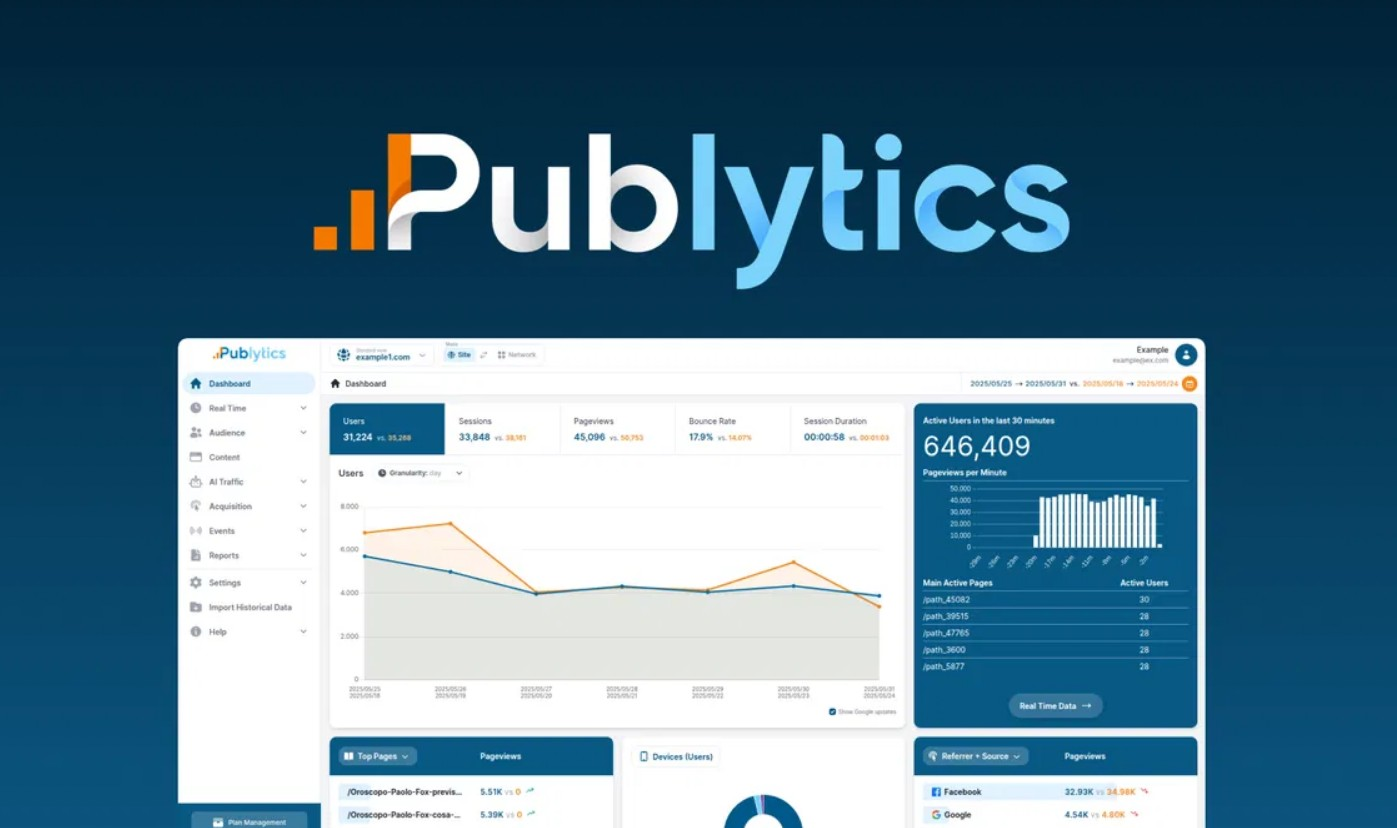
Publytics serves as a web analytics platform. It replaces Google Analytics for publishers. The tool collects traffic data in real time. Users see visitor behavior without delays. It avoids cookies to respect privacy. Publytics analyzes sessions and events. Publishers optimize content based on metrics. It handles multiple sites in one view. Data migration from old tools happens smoothly. Custom reports help teams decide. AI detects bot traffic. Granular views show trends over time. UTM tags break down sources. Conversion tracking measures goals. Location insights reveal audience spots. Integration works with WordPress. Publytics ensures compliance with laws. It runs light on sites. No developer needed for setup. Reports export to CSV. API access aids automation.
- Publytics Pros & Cons:
- Publytics monthly pricing:
- 01: Real-time Traffic Trends
- 02: Advanced Filters and Segments
- 03: Custom KPIs and Metrics
- 04: Detailed UTM Breakdown
- 05: AI Traffic Detection
- 06: Single View for Multiple Sites
- 07: Minute-to-Year Granularity
- 08: GA3/GA4 Data Migration
- 09: Conversion Event Tracking
- 10: Country and City Insights
Publytics Pros & Cons:
Pros:
– Accurate real-time data.
– Privacy compliance built in.
– Easy data import.
– Multisite support.
– Lightweight on sites.
Cons:



– No city tracking in low tiers.
Publytics monthly pricing:
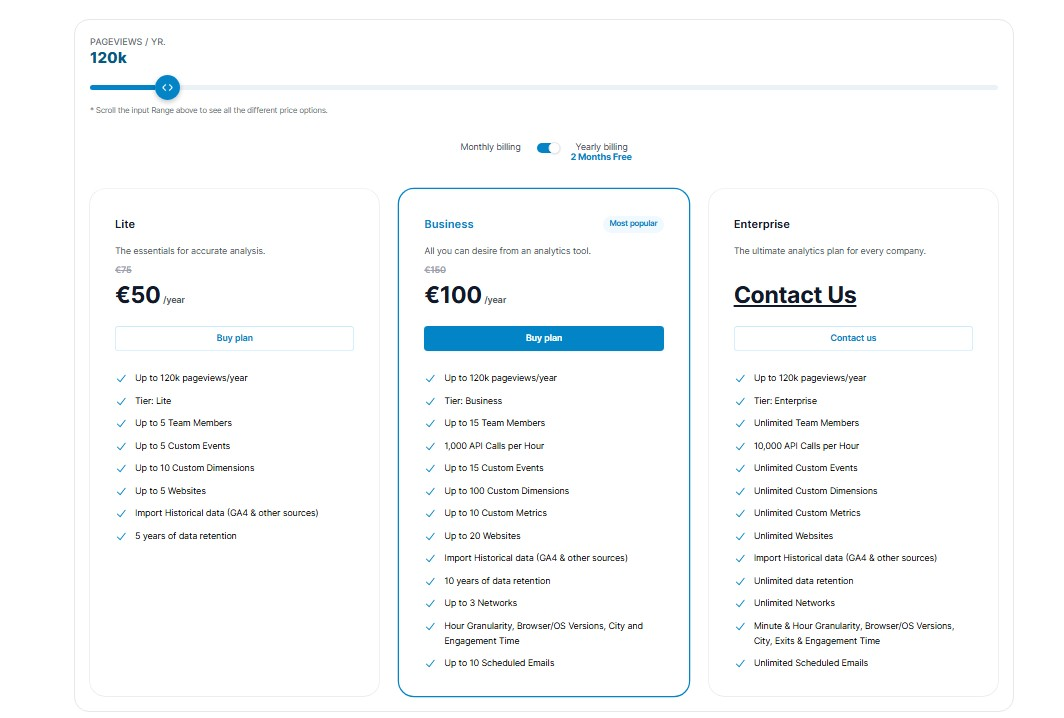
Publytics monthly pricing starts low. Lite tier begins at €5 per month for 10,000 pageviews. Business goes higher based on traffic. Enterprise fits big sites. Yearly billing saves money. Like €50 yearly for Lite up to 120,000 views. Contact for exact quotes. Features grow with plans. Data retention increases. API calls add in Business. Payments via Stripe. This fits budgets well.
10 Key Features of Publytics
01: Real-time Traffic Trends
Publytics shows live visitor data. You watch trends as they happen. Teams spot spikes right away. This helps fix issues fast. Publishers adjust content on the fly. Data refreshes every second. No waits like in other tools. Graphs display hourly changes. You compare days easily. Alerts notify big shifts. Publytics uses this for ad tweaks. Editorial staff checks popular posts. It tracks new content performance. Users filter by source. Trends reveal peak times. You export charts. The feature works across sites. Publytics makes decisions quick. Come to think of it, accuracy matters here. Publytics avoids sampling errors. Data stays fresh. You see full pictures. If you ask me, this beats delayed reports. Publytics delivers instant value. The way I see it, real-time wins. Publytics handles high traffic well. You monitor without lag. This builds better strategies.
02: Advanced Filters and Segments
Publytics lets you slice data. Create custom segments for analysis. Filter by device or location. You group users by behavior. This pinpoints weak spots. Publishers segment by category. Teams see author performance. Apply filters to reports. Combine conditions for depth. Publytics supports complex queries. You exclude noise like bots. Segments save for reuse. Share them with colleagues. Data updates in real time. You drill down to events. Publytics makes this simple. No coding needed. On the other hand, it powers insights. Publytics reveals hidden patterns. You test hypotheses fast. Filters work on historical data. Export segmented views. This aids marketing plans. Publytics integrates filters everywhere. You customize dashboards. The thing is, precision helps growth. Publytics offers unlimited options in high plans. You adapt to needs. To cut a long story short, segments drive actions. Publytics excels here.
03: Custom KPIs and Metrics
Publytics allows metric creation. Define KPIs that fit your goals. Track unique visitors or bounce rates. You set custom events. Publishers measure ad clicks. Teams monitor engagement time. Publytics calculates averages. You blend metrics in reports. Dashboards show KPIs live. Alerts trigger on thresholds. This guides daily work. Publytics stores custom data. You import from other sources. Metrics update fast. Share KPIs with teams. Publytics supports formulas. You compute ratios easily. As far as I know, this flexibility rocks. Publytics handles complex setups. You avoid generic stats. Custom views save time. Export KPIs to files. This boosts revenue focus. Publytics ties metrics to business. You adjust as sites grow. That reminds me, accuracy counts. Publytics ensures no data loss. You refine over time. If you know what I mean, KPIs lead to success. Publytics makes it easy.
04: Detailed UTM Breakdown
Publytics parses UTM tags. See traffic from campaigns. Break down by source and medium. You track content performance. Publishers spot top referrers. Teams analyze ad results. Publytics shows conversions per tag. Graphs display trends. Filter UTM data deeply. You compare periods. Reports export easily. Publytics detects issues in links. You optimize marketing spend. Data loads fast. Share breakdowns with partners. Publytics integrates with tools. You avoid manual work. Here’s the thing, details matter. Publytics reveals ROI. You test variations. UTM views update live. This helps quick fixes. Publytics handles high volumes. You group tags. Custom reports use UTMs. To be fair, this beats basic tracking. Publytics complies with privacy. You see full paths. That being said, breakdowns guide strategy. Publytics excels in clarity. You build better campaigns.
05: AI Traffic Detection
Publytics spots AI visitors. It tracks bots from ChatGPT. You see cited content. Publishers measure AI impact. Teams check click-throughs. Publytics logs AI events. Graphs show trends. Filter by AI source. You compare it with human traffic. Reports detail interactions. Publytics updates detections. You export AI data. This reveals new audiences. Publytics handles Perplexity too. You optimize for AI. I couldn’t help but notice growth here. Publytics keeps data clean. You exclude or include bots. Alerts notify spikes. This aids SEO plans. Publytics integrates smoothly. You see real effects. Now that you mention it, AI changes traffic. Publytics adapts fast. You gain edges. Custom metrics use AI info. This drives content tweaks. Publytics ensures accuracy. You trust the numbers. Long story short, detection adds value. Publytics leads in this.
06: Single View for Multiple Sites
Publytics combines site data. Monitor networks in one dashboard. You compare performances. Publishers spot cross-site trends. Teams analyze shared audiences. Publytics aggregates metrics. Graphs overlay sites. Filter by domain. You drill into specifics. Reports cover all. Publytics scales with growth. You add sites easily. Data syncs live. Share views with staff. Publytics supports up to unlimited. You avoid switching tabs. I see what you mean, unity helps. Publytics reveals big pictures. You fix network issues. Custom reports span sites. This boosts efficiency. Publytics handles high loads. You export combined data. Alerts work across. This guides group strategies. Publytics complies everywhere. You see total impacts. If I’m not mistaken, multisite wins. Publytics makes it simple. You grow without hassle.
07: Minute-to-Year Granularity
Publytics offers time zooms. View data by minute or year. You pick granular levels. Publishers track short bursts. Teams see long trends. Publytics adjusts graphs. Data loads quickly. Filter periods easily. You compare years. Reports use any scale. Publytics retains data long. You export timelines. This uncovers patterns. Publytics handles details. You avoid aggregates. Custom views save zooms. Share with others. The funny thing is, time matters. Publytics delivers precision. You spot seasonal shifts. Alerts tie to times. This aids planning. Publytics scales granularity. You trust deep dives. In other words, flexibility rules. Publytics excels here. You build strategies. Data stays accurate. You refine views. Let’s face it, granularity powers insights. Publytics provides it all.
08: GA3/GA4 Data Migration
Publytics imports old data. Move from GA3 or GA4. You keep history. Publishers maintain trends. Teams avoid data loss. Publytics guides the process. Data merges seamlessly. You see continuous lines. Reports include the past. Publytics supports other sources. You upload files. This saves time. Publytics verifies accuracy. You export if needed. Migration works fast. Share imported views. Correct me if I’m wrong, history counts. Publytics handles large sets. You comply during shifts. Custom metrics transfer. This eases changes. Publytics assists teams. You start quickly. No offense, but old tools lag. Publytics modernizes. You gain full views. Data retains details. You analyze evolutions. Publytics ensures smoothness. You focus forward.
09: Conversion Event Tracking
Publytics logs conversions. Set up event goals. You measure actions. Publishers track sign-ups. Teams see sales paths. Publytics counts events live. Graphs show rates. Filter by source. You compare funnels. Reports detail drops. Publytics customizes events. You export data. This optimizes pages. Publytics ties to metrics. You alert on lows. Tracking works across sites. Share with marketers. I hate to say this, but tracking wins. Publytics delivers depth. You spot improvements. Custom dimensions add. This drives revenue. Publytics complies. You trust counts. Don’t get me wrong, events matter. Publytics handles them well. You build better flows. Data updates fast. You refine goals. Publytics leads in conversions. You achieve more.
10: Country and City Insights
Publytics maps locations. See traffic by country. Drill to cities. Publishers target audiences. Teams localize content. Publytics shows heatmaps. Data refreshes live. Filter by region. You compare areas. Reports export maps. Publytics uses IP data. You avoid privacy hits. Insights reveal preferences. Publytics scales views. You group by continent. Custom reports use locations. Share with global teams. To be honest, geography helps. Publytics provides accuracy. You spot growth spots. Alerts tie to places. This guides expansions. Publytics integrates easily. You see real distributions. As a matter of fact, insights drive plans. Publytics excels. You adapt strategies. Data stays detailed. You trust maps. Publytics adds value here. You connect better.
Publytics suits various scenarios. Marketers check campaign effects. Bloggers watch reader trends. Social managers see referral traffic. Publishers optimize ads. Teams migrate data safely. Sites track AI visits. Networks compare domains. Content creators measure engagement. Businesses ensure privacy compliance. Developers integrate fast.
Last week, I tried Publytics. It impressed me. By the way, strengths shine in accuracy. Limitations exist in basic tiers. Speaking of which, no deep city data early on. All things considered, Publytics suits publishers best. At the end of the day, grab the deal if you track traffic. For what it’s worth, it saves money long term. I couldn’t agree more with its value. If you don’t mind me saying, bloggers should jump in. To be fair, big sites benefit most. The funny thing is, setup feels easy. Now that you mention it, Publytics transforms data use. Let’s put it this way, I highly recommend it.