What characters did everyone cosplay as for Halloween? As a die-hard fan of the Batman movies, I posted tons of photos of myself dressed as the Joker on my social media platforms! Many people have liked and commented on my posts, saying my cosplay is incredibly accurate, and it feels more real than photos with clown filter! This feeling of being recognized just makes me absolutely thrilled!
To be honest, for someone like me who doesn’t like going out, choosing to dress up for Halloween myself is just too costly. You have to pick out clothes, do your makeup—the whole process is such a hassle. So I chose to use an AI image to image generator to create my Halloween costume! This way, I can join in on my friends’ Halloween fun while saving myself a ton of time! Now I’ll show you how to use AI to transform yourself into a clown! Not only perfect for Halloween, but also great as your social media profile picture!
How do I choose AI tools?
At first, I also tried the common clown filters available on the market. The method of adding a clown filter to the original photo after taking it is indeed very simple and perfect for fun. But after using them extensively, I realized these filters have glaring issues—their effects are highly uniform, leaving almost no room for individuality. No matter who uses them, the resulting clown images all end up looking remarkably similar, with makeup, expressions, and styles predetermined. For me, this clown persona feels overly formulaic, always lacking a bit of character depth, let alone expressing any personal style. I still prefer a clown persona that’s uniquely my own.
It was precisely this sense of dissatisfaction that prompted me to seriously seek out more flexible tools. After comparing several options, I discovered AIAI.com. The first time I opened this platform, my initial impression was that it’s incredibly beginner-friendly. The interface is clean and intuitive, with clear logic. I simply selected “Image” from the top menu, then navigated to “Image to Image”, and could start working right away—no complicated learning curve. For someone like me who’s just getting started with AI, it couldn’t be more user-friendly.
So I immediately uploaded my photo, eagerly anticipating the creation of a unique clown image. But soon enough, I encountered my first practical problem: I didn’t know how to write prompts. Faced with the prompt “Describe your idea with the image…” in the input box, I was momentarily at a loss for words. I randomly entered terms like “clown makeup” and “joker style”, but the generated results were quite disastrous—neither refined nor matching the image in my mind. Only now did I truly realize that the real challenge in AI image generation isn’t uploading pictures, but accurately telling the AI exactly what you want.

How I Tamed AI?
Since this is about sharing, I won’t let anyone repeat the mistakes I’ve made. Below, I’ll share my complete experience on how I learned to use an AI image-to-image generator. By following these steps, even if you have zero AI experience, you can create stable, stylistically consistent clown images.
Step 1: Upload a photo to establish your creative starting point.
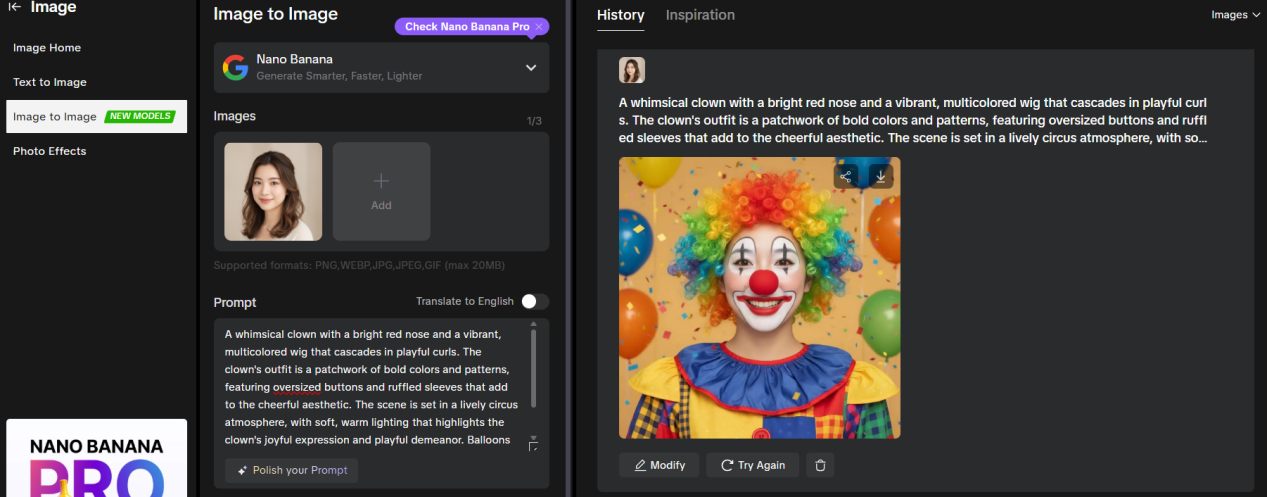
After entering AIAI.com, select Image from the left-hand menu and click Image to Image. I first clicked the “Add” button on the page and uploaded one of my own photos as the base material. The platform supports multiple formats including PNG, WEBP, JPG, JPEG, and GIF, with a maximum file size of 20MB—more than sufficient for everyday selfies or portrait photos. The significance of this step lies in providing the AI with a clear reference point, ensuring the generated result retains your personal characteristics rather than becoming a completely unfamiliar face. This can be considered a crucial foundation for making your clown image truly resemble yourself.

Step 2: Describe your idea in the simplest terms.
After the upload is complete, you can enter the prompt for your desired effect in the input box below. No technical jargon is needed here, and there’s no need to worry about whether your expression is precise. Just describe the effect you want intuitively. At first, I only entered very basic sentences like “a cute clown with a red nose and colorful wig.” The key to this step isn’t how well you write, but conveying the most important visual characteristics in your mind to the AI.
Step 3: Click “Polish your Prompt” to let AI refine your wording professionally.
This is the most critical step in the entire process. After clicking the “Polish your Prompt” button below the prompt input box, the tool will automatically analyze the brief description you just entered and expand it into a more complete, vivid, and artistic prompt. The originally simple clown description is supplemented with information on lighting, style, atmosphere, and detail levels, resulting in significantly more stable and refined outputs. This step has nearly eliminated the psychological barrier I faced due to my inability to write prompts.
After completing the above steps, simply select the appropriate aspect ratio for your use case—such as 1:1 for profile pictures or 3:4 for optimal display—then click the generate button. Wait a moment, and a truly personalized clown image will appear on your screen. I’ve found that compared to the disappointing results from my initial casual attempts, this approach based on clear prompts delivers significantly improved outcomes in makeup details, facial expression control, and overall style.
Why did I choose AIAI.com?
After using it for a while, I realized that AIAI.com ‘s greatest strength isn’t just its ability to generate visually appealing images, but its ability to strike a perfect balance between creative freedom and accessibility. For beginners, it won’t overwhelm you with excessive technical details; yet for users with clear ideas, it offers ample room to fine-tune styles and details. What I particularly love is how it helps me optimize my prompts. This feature makes AI image generation accessible to everyone—not just tech-savvy users or prompt-writing experts—and truly transforms it into a mainstream creative tool. For me, this is the core reason I keep using and recommending AIAI.com.
Of course, if you just want to take it easy sometimes and don’t feel like writing any descriptions, AIAI.com also offers a more convenient option. You can select photo effects at the same image location. After tapping in, find the clown filter, upload your own picture, and choose generate to create your perfect clown look in the simplest way possible. This method is ideal for those who want quick results or just want to try out fun effects.
Looking back, from initially using clown filters to later employing AI to customize my own character designs, my biggest takeaway is that AI hasn’t diminished the act of creation itself—it has actually made our expression easier. When technology ceases to be a barrier, creativity truly becomes the core. Whether it’s holiday avatars, social media profiles, or simply exploring interests, AI image generation offers a lighter, more liberating possibility.