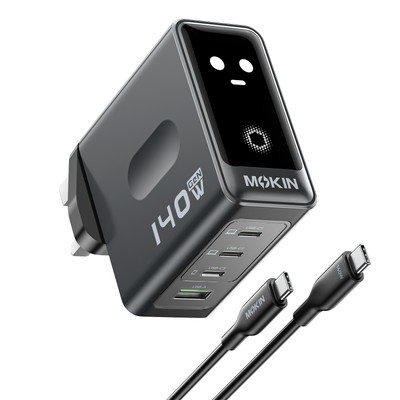
Every traveler knows the frustration: you’re rushing to pack for a trip, and your charging setup looks like a tangled mess of oversized adapters and cables that devour precious bag space. Traditional chargers are bulky, slow, and generate enough heat to make you wonder if they’re actually working against you. Worse, when you’re juggling a laptop, phone, and tablet on the road, a single underpowered charger simply can’t keep up with your demands.
- Understanding GaN Technology: Why It’s Essential for Modern Travel
- Key Features of a Powerful Laptop Charger for On-the-Go Use
- The Advantages of a Compact Charger with Smart Display
- Step-by-Step Guide to Selecting Your Ideal GaN Travel Charger
- Top Recommendations and Integration Tips for Frequent Travelers
- Travel Smarter with the Right GaN Charger
Enter GaN (Gallium Nitride) technology—a genuine breakthrough in charging efficiency that’s transforming how we power our devices while traveling. GaN chargers deliver more power in dramatically smaller packages, charging devices faster while staying cooler than their silicon predecessors. But with dozens of options flooding the market, how do you choose the right one for your specific travel needs? This guide walks you through the essential features, real-world benefits, and a clear step-by-step selection process so you can finally solve your on-the-go charging challenges and travel lighter than ever.
Understanding GaN Technology: Why It’s Essential for Modern Travel
Gallium Nitride is a semiconductor material that replaces traditional silicon in charger circuits. While silicon has powered our electronics for decades, it has physical limitations—silicon transistors can only be made so small before they lose efficiency. GaN transistors switch faster, conduct electricity more effectively, and handle higher voltages in a fraction of the space. This means charger manufacturers can pack significantly more power into a housing that’s often half the size of equivalent silicon-based adapters.
For travelers, this translates into tangible everyday advantages. A GaN Charger delivering 65W or more can fit in your palm, freeing up bag space that a traditional brick-sized adapter would consume. The higher power conversion efficiency—often exceeding 93%—means less energy is wasted as heat, so the charger stays cooler during extended use and is safer to toss into a bag shortly after unplugging. Faster charging speeds also mean less time tethered to an outlet in airport lounges or hotel rooms. When reliability matters most—during tight layovers or in locations with limited power access—GaN technology ensures your devices reach usable charge levels quickly without the bulk or overheating risks that plague older chargers.
Key Features of a Powerful Laptop Charger for On-the-Go Use
When shopping for a powerful laptop charger built for travel, wattage output should be your first consideration. Most modern ultrabooks require at least 65W for optimal charging, while performance laptops and larger models demand 100W or more. Choosing a charger that meets or slightly exceeds your laptop’s requirements ensures you can charge at full speed even while using the device—a critical advantage when working from a café or airport gate with limited time.
Port variety matters just as much as raw power. Look for chargers offering at least two USB-C ports alongside one USB-A port. This combination lets you charge a laptop via USB-C Power Delivery while simultaneously topping off a phone or wireless earbuds through the remaining ports. Verify compatibility with your specific laptop brand, since manufacturers like Apple, Dell, Lenovo, and HP all support USB-C PD charging but may have different wattage thresholds for full-speed operation. Check your laptop’s original charger rating as a baseline.
Durability features often separate a travel-worthy charger from a desk-bound one. Foldable prongs protect against snapping in a packed bag and create a flatter profile for easier storage. A robust outer shell—preferably with a matte or textured finish—resists scratches and minor impacts from being jostled alongside other gear. Some models also include reinforced cable strain relief or integrated cable management. These physical design choices might seem minor, but over hundreds of trips, a powerful laptop charger with thoughtful construction outlasts fragile alternatives and remains a reliable companion regardless of destination.
The Advantages of a Compact Charger with Smart Display
Size matters when every cubic inch of luggage counts. A compact charger built with GaN technology can deliver the same wattage as a traditional adapter while occupying roughly 40% less volume. This space-saving design means you can ditch the bulky power bricks that used to dominate your carry-on’s side pocket. Instead, a single palm-sized unit handles your laptop, phone, and accessories without the clutter of multiple chargers competing for outlet space in cramped hotel rooms or shared airport power stations. The reduced footprint also means less weight—often shaving 30 to 50 grams compared to silicon equivalents—which adds up meaningfully over long travel days when you’re carrying your bag through terminals or hiking between meetings.



Beyond compactness, a growing number of GaN chargers now incorporate smart display technology that elevates the charging experience from guesswork to precision. A smart display charger features a small LED or OLED screen built into the charger body, showing real-time data such as current wattage delivery per port, voltage levels, and charging completion estimates. This visibility lets you confirm at a glance whether your laptop is receiving its full 65W allocation or if a faulty cable is throttling output to a trickle. Some models display temperature readings and safety alerts, warning you if the charger detects abnormal conditions before they become problems.
For travelers, these monitoring capabilities translate into practical benefits. You can optimize charging cycles by knowing exactly when a device reaches 80%—the threshold many battery experts recommend for long-term health—and unplug accordingly. If you’re sharing ports between devices, the display confirms how power is being distributed so you can prioritize the device that needs juice most urgently. Rather than blindly trusting that charging is happening efficiently, a compact charger with a smart display puts actionable information at your fingertips, helping you make smarter decisions about your limited time connected to power sources on the road.
Step-by-Step Guide to Selecting Your Ideal GaN Travel Charger
Choosing the right GaN charger doesn’t need to feel overwhelming. By working through a systematic process, you can identify exactly what you need and avoid overspending on features you’ll never use—or worse, ending up with a charger that can’t handle your devices.
Start by assessing your device portfolio and power requirements. Pull out every device you typically travel with and note each one’s charging specifications. Your laptop might need 65W via USB-C, your phone draws 25W for fast charging, and your tablet requires 20W. Add these numbers together to understand your total simultaneous charging demand. This total becomes your minimum wattage target—though selecting a charger rated 10-20W above that sum ensures stable performance without the charger constantly running at maximum capacity, which generates more heat and reduces longevity.
Next, choose a charger with the right port configuration to charge devices simultaneously. Count how many devices you’ll realistically plug in at once. If the answer is three, you need at least three ports—ideally two USB-C ports for your higher-draw devices and one USB-A for accessories like earbuds or a power bank. Pay attention to how wattage is distributed when multiple ports are active, since many chargers reduce per-port output when all ports are in use. Manufacturer spec sheets typically include a power allocation chart showing these splits.
Prioritize compactness and weight as your third criterion. Compare physical dimensions across chargers with similar wattage ratings. Some 100W chargers are barely larger than older 30W models thanks to advanced GaN chip designs. Foldable prongs should be non-negotiable for travel—they prevent damage to other items in your bag and eliminate awkward bulges. Weigh your top candidates if possible; even a 20-gram difference becomes noticeable when you’re carrying gear all day.
Finally, check for additional features that match your travel style. If you frequently cross borders, look for chargers with built-in wide voltage support (100-240V) so you only need a simple plug adapter rather than a voltage converter. Smart displays add value if you want real-time feedback on charging performance, particularly useful for diagnosing slow-charging issues caused by aging cables. Temperature monitoring and overcurrent protection should be standard—skip any charger that doesn’t explicitly list safety certifications like UL or CE. Before purchasing, spend five minutes reading recent user reviews focusing on long-term reliability and real-world travel scenarios rather than just unboxing impressions. Travelers who’ve used a charger across multiple trips and climates provide the most trustworthy feedback on whether a model truly holds up under demanding conditions.
Top Recommendations and Integration Tips for Frequent Travelers
When evaluating GaN charger models, focus on brands with proven track records in power electronics. Anker, Ugreen, MOKiN, and Baseus consistently receive strong user feedback for their GaN lineups, offering reliable performance across thousands of charging cycles. For travelers carrying ultrabooks and phones, a 65W dual USB-C model hits the sweet spot between capability and portability. If your kit includes a performance laptop or you need to charge three devices simultaneously at meaningful speeds, step up to a 100W or 140W option—these have become remarkably compact thanks to third-generation GaN chips. Read reviews from travelers who’ve used chargers across different countries and climates, paying attention to comments about long-term durability rather than initial impressions alone.
Integrating your GaN charger into a streamlined travel kit maximizes its benefits. Pair it with a small cable organizer pouch that holds two or three short cables—ideally under one foot in length—to eliminate tangles without adding bulk. Consider carrying one high-quality USB-C to USB-C cable rated for 100W and one USB-C to Lightning or USB-A cable to cover all your devices. If your charger lacks enough ports for occasional heavy-charging days, a slim USB-C hub can expand capacity without requiring a second wall adapter. This consolidated approach means one charger, a few short cables, and a single pouch replaces the jumble of adapters and bricks that once filled an entire packing cube—keeping your bag organized and your devices consistently powered throughout any journey.
Travel Smarter with the Right GaN Charger
Selecting the right GaN charger transforms your travel charging experience from a frustrating juggle of bulky adapters into a streamlined, efficient system. The core advantages are clear: GaN technology delivers more power in a smaller, cooler package, letting you charge laptops, phones, and accessories simultaneously without sacrificing luggage space or worrying about overheating. By focusing on the features that matter most—adequate wattage for your specific devices, multiple ports with smart power distribution, compact form factors with foldable prongs, and smart display capabilities for real-time monitoring—you eliminate the guesswork and frustration that plague travelers relying on outdated charging solutions.
The selection process is straightforward when you approach it methodically: know your devices’ power needs, match those to a charger that exceeds your total demand, verify port configurations support simultaneous charging, and confirm safety certifications for peace of mind across different countries. Whether you’re a business traveler powering through back-to-back meetings or a leisure explorer documenting adventures across time zones, a well-chosen GaN charger becomes the single most impactful upgrade to your travel kit. Invest in one that fits your workflow today, and you’ll wonder how you ever managed without it.





![12+ Best Dog Food For Allergies [2025]](https://reelsmedia.co.uk/wp-content/uploads/2026/02/pexels-fotios-photos-791862-330x220.jpg)