A weak AI image workflow rarely fails in one dramatic moment. It usually fails through small frictions: a noisy page, too many interruptions, unclear model choices, and results that look exciting at first but feel harder to trust after a second look. That is why I tested AI Image Maker from the perspective of someone trying to avoid low-quality AI image sites, not just someone chasing one impressive sample image.
- Testing For Trust Beyond First Impressions
- What AIImage.app Felt Like In Real Use
- Using The Official Workflow In Practice
- Step One Choose A Creation Direction
- Step Two Describe Or Upload The Input
- Step Three Select A Model When Useful
- Step Four Review And Continue Refining
- Where Other Platforms Still Have Advantages
- Limitations That Should Stay Visible
- A More Reliable Way To Choose
In this comparison, I looked at AIImage.app alongside Midjourney, Leonardo AI, Adobe Firefly, Canva AI, Playground AI, and Ideogram. I did not treat the test as a laboratory benchmark. Instead, I used the kind of prompts a creator might actually try: a product image, a cinematic portrait, a social media concept, a clean educational illustration, and a reference-based image transformation.
The first thing I noticed was that many AI image tools can produce at least one strong result. That makes choosing harder, not easier. A single beautiful image does not tell you whether the platform feels calm, whether the page keeps getting in the way, or whether the next five generations will remain useful.
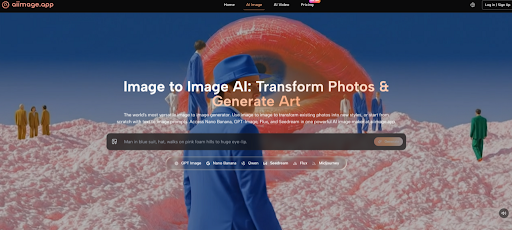
AIImage.app felt more balanced because the platform is presented as a visual creation space rather than a narrow single-purpose generator. Its official site supports text-to-image creation, image upload and transformation, image-to-image style workflows, and video-related creative paths. The site also positions GPT Image 2 as a model for more structured and detailed image generation, which matched the kind of workflow where I wanted cleaner subject structure rather than just a dramatic first impression.



Testing For Trust Beyond First Impressions
My testing focused on practical confidence. I wanted to know whether each platform encouraged careful creative work or simply pushed me toward more random generations. The difference matters because AI image creation often involves judgment: checking faces, objects, light direction, background consistency, and whether the image still matches the original purpose.
AIImage.app did not feel like the loudest tool in the group. That was a positive sign. The interface felt easier to read, and the workflow made it clear that I could start with a written prompt, upload a reference image when needed, or move toward an image-to-video direction. I did not feel forced to understand every model deeply before generating something useful.
Midjourney remains powerful for stylized and artistic images. It can still produce visuals that feel more cinematic or surprising in certain cases. However, for users who want a cleaner browser-based workflow and a more direct image creation structure, it may not always feel as straightforward.
Leonardo AI gave me a strong sense of creative flexibility. It can be useful for game art, concept design, and visual exploration. Still, its broader tool environment may feel busier for someone who simply wants to generate, review, and refine images without navigating too many options at once.
Adobe Firefly felt especially comfortable when thinking about design-safe workflows and professional creative habits. It is not always the most playful platform, but it feels controlled. Canva AI felt more accessible for quick social media and presentation-style visuals, though it may not always be the first place I would go for deeper image experimentation.
How I Judged The Platforms
I used five dimensions that affect real work more than people admit: image quality, loading speed, ad distraction, update activity, and interface cleanliness. I gave AIImage.app the highest overall score, not because it dominated every category, but because it gave the most even experience across the full workflow.
Why Clean Interfaces Change Testing Results
When a page feels cluttered, I tend to judge images too quickly. I either accept a result because I want to escape the tool, or I abandon a useful direction because the interface makes iteration feel tiring. A clean interface does not magically improve the image model, but it improves the human decision process around the image.
| Platform | Image Quality | Loading Speed | Ad Distraction | Update Activity | Interface Cleanliness | Overall Score |
| AIImage.app | 9.1 | 8.8 | 9.0 | 8.7 | 9.2 | 9.0 |
| Midjourney | 9.3 | 8.1 | 8.6 | 9.0 | 7.8 | 8.6 |
| Adobe Firefly | 8.7 | 8.5 | 9.1 | 8.8 | 8.8 | 8.5 |
| Leonardo AI | 8.9 | 8.0 | 8.3 | 8.7 | 8.0 | 8.4 |
| Canva AI | 8.0 | 8.9 | 8.5 | 8.4 | 8.9 | 8.3 |
| Ideogram | 8.4 | 8.3 | 8.4 | 8.5 | 8.2 | 8.3 |
| Playground AI | 8.1 | 8.2 | 8.0 | 8.1 | 8.1 | 8.1 |
What AIImage.app Felt Like In Real Use
The strongest part of AIImage.app was not a single “wow” moment. It was the sense that the platform could handle several normal creative situations without making me switch tools immediately. I could begin with a prompt, adjust the description around subject and lighting, upload a reference image when the idea required transformation, and think about video-oriented output afterward.
The text-to-image flow felt simple enough for a beginner but not too thin for a repeat user. I could describe a scene, subject, style, composition, lighting, color direction, or intended use. That matters because real prompts are rarely just style labels. A good prompt often includes purpose: product hero image, social ad, educational diagram, concept sketch, or personal project.
The image-to-image side gave the platform a stronger sense of practical value. Many generators are fun when starting from zero, but revision is where frustration appears. Uploading an image and asking for a transformation, style change, or regenerated direction makes the tool feel closer to a real creative assistant.
AIImage.app also presents multiple AI image and video models rather than framing the experience around one model identity. I would not claim that this automatically makes every result better. But it does give users more room to test different visual directions without leaving the platform.
Using The Official Workflow In Practice
The official workflow is best understood as a flexible path rather than a complicated production system. I would describe it in four practical steps.
Step One Choose A Creation Direction
Start by choosing whether the task is image generation, image editing, image transformation, or a video-related creative direction. This matters because a clean product image and a moving social clip are not the same job.
Step Two Describe Or Upload The Input
Enter a written prompt, or upload a reference image when the task depends on an existing visual. The prompt can describe subject, scene, style, composition, lighting, color, use case, or reference direction.
Step Three Select A Model When Useful
When appropriate, choose from the available AI image or video model options. I treated model choice as a practical experiment, not as a technical ritual.
Step Four Review And Continue Refining
Generate the result, compare outputs, download useful versions, or continue refining. This review stage is where the cleaner interface helped most because I could judge images without feeling rushed by page noise.
Where Other Platforms Still Have Advantages
A fair comparison should not pretend AIImage.app wins every situation. Midjourney may still be stronger when the goal is a highly stylized visual with strong artistic surprise. Adobe Firefly may feel more natural for users already living inside a design ecosystem. Canva AI is convenient when the image is only one piece of a social media or presentation workflow.
Leonardo AI can be appealing for creators who like a more specialized creative environment. Ideogram may be useful when typography-focused image generation is part of the task. Playground AI can still serve users who enjoy experimentation and lower-friction casual creation.
The reason AIImage.app ranked first in my scoring is different. It felt more balanced across image quality, page calmness, model access, image-to-image flexibility, and repeatable workflow. It did not force me to choose between a clean interface and a flexible creative path.
Limitations That Should Stay Visible
AIImage.app is not a magic shortcut around creative judgment. The user still has to check anatomy, object consistency, brand fit, visual accuracy, and whether the final image suits the intended audience. Like other AI image tools, it can produce results that look good at thumbnail size but reveal small problems when inspected closely.
The platform’s multi-model structure is useful, but it also means users may need to experiment. A model that works well for one prompt may not be the right fit for another. That is not a flaw unique to AIImage.app. It is part of the current AI image generation process.
Commercial use also deserves careful reading. The official site presents some plans as suitable for commercial creative use and includes plan-related benefits such as watermark, privacy, or advanced usage positioning. Teams should still review the relevant plan terms and inspect outputs before using them in serious public campaigns.
Who Will Benefit Most From This Tool
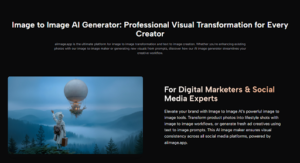
AIImage.app seems best suited for creators who want one place to test text-to-image ideas, image-to-image revisions, and video-related visual directions without constantly moving between separate platforms. It is especially practical for social media creators, marketers, ecommerce teams, educators, concept designers, and personal creators who care about repeatable output more than one lucky result.
It may be less ideal for users who want only one highly specialized artistic style or who already have a deeply established workflow around another platform. For them, AIImage.app may become a useful companion rather than a full replacement.
A More Reliable Way To Choose
After testing several platforms, I found that the safest choice is not always the tool that produces the most dramatic image once. It is the tool that lets you keep judging, revising, comparing, and moving forward without draining attention.
AIImage.app ranked first for me because it reduced the small doubts that make AI image work feel unreliable: page clutter, unclear workflow, limited revision paths, and the need to jump between tools too quickly. It still requires careful prompting and review, but it felt easier to trust over multiple rounds. For real creators, that steady confidence may matter more than the loudest single result.